


UX/UI Case Study
UX/UI Case Study
Optimizing a B2C self-care SaaS for AI-driven pioneering software Companies
Optimizing a B2C self-care SaaS for AI-driven pioneering software Companies





Product Overview
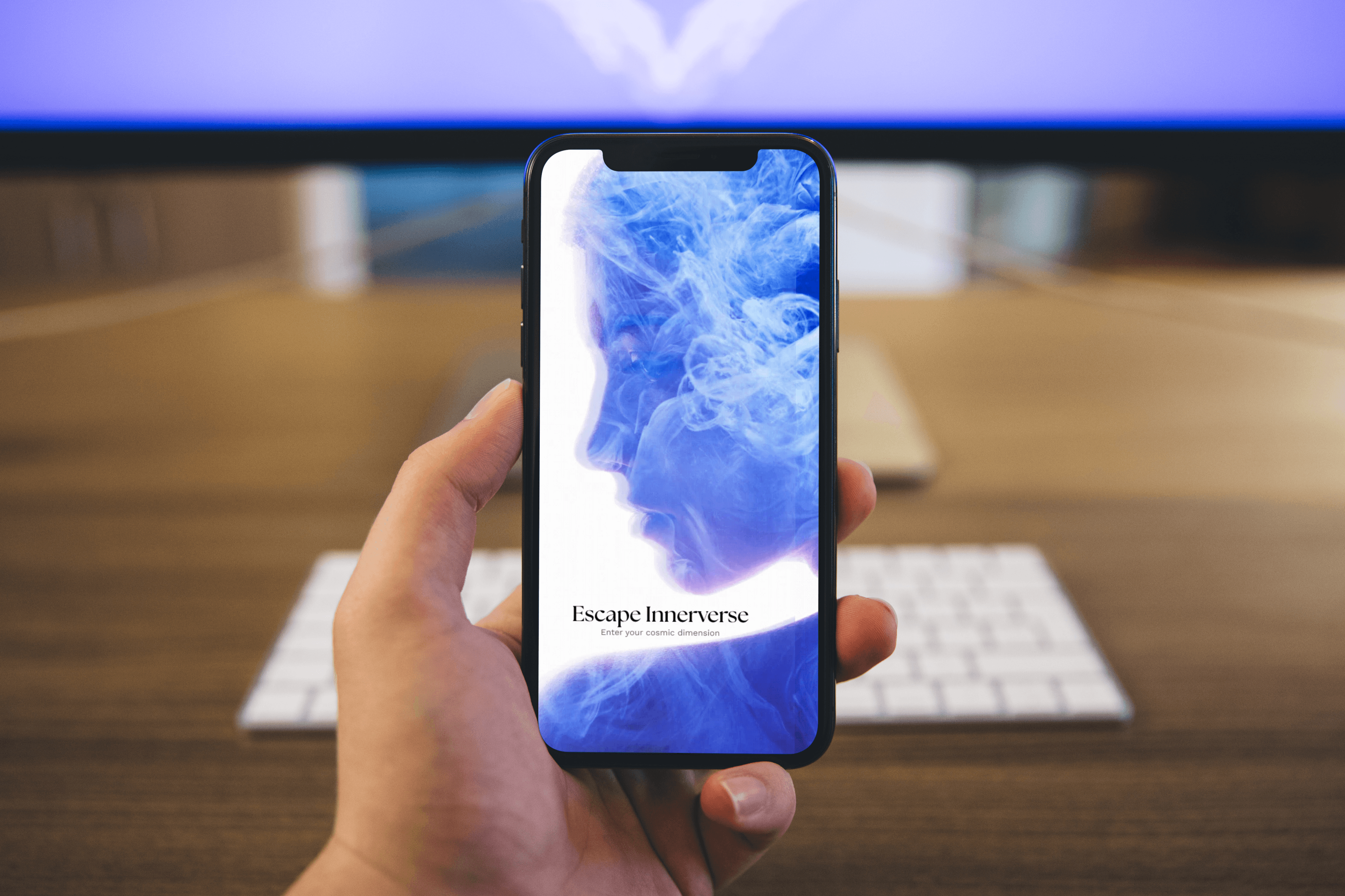
Escape is a self-care app that employs generative AI, including Lucille, a multilingual 3D animation companion, to create personalized wellness journeys that support mental, emotional, and physical well-being. I joined the team in December as a UX Researcher intern, focusing on researching and developing new features for the app. This case study explores my role in researching Escape’s user experience, specifically investigating and implementing the Home, Explore, Innerverse, and Lucille page to simplify and enhance the user experience.
Problem Statement
With the platform using a range of comprehensive functionalities — including the Home page, Mind section, & Explore page — these features are antiquated and less interactive. This makes it challenging for users to engage and diminishes their overall experience with the app.
With the platform using a range of comprehensive functionalities — including Home page & Mind section— these features are antiquated and less interactive. This makes it challenging for users to engage and diminishes their overall experience with the app.
Research - User Interviews
Since we are designing and researching for users, our team conducted 5 beta interviews from a diverse range of ethic backgrounds, learning and teaching various self-care routines to gain a deep understanding of the apps' workflows and challenges. Below are some key takeaways from these user interviews that informed the design of the Home page, Mind section, & Explore page. We also include research on users' immersive AR/VR experiences within emotional wellness.
Since we are designing and researching for users, our team conducted 5 beta interviews from a diverse range of ethic backgrounds, learning and teaching various self-care routines to gain a deep understanding of the apps' workflows and challenges. Below are some key takeaways from these user interviews that informed the design of the Home page, Mind section, & Explore page. We also include research on users' immersive AR/VR experiences within emotional wellness.
Pain Points
Design Pages

Outdated, non-interactive features that fail to engage users and reduce long-term retention
High hardware requirements for immersive features that exclude users with older devices
Cluttered layout that buries primary actions and makes it hard for users to start or customize sessions quickly
Poor affordances for interactive elements (buttons, sliders) that lead to missed features or accidental taps
Limited customization options for themes, color contrast, and font sizes, harming accessibility and user comfort
Lack of component consistency across pages, resulting in a fragmented and unprofessional feel
Poorly designed modular templates that don’t adapt well to varied content lengths
AR/VR

Disorientation or Dizziness
Eye Strain or Headaches
Limited Session Tolerance (Under 20 Minutes)
Uncertainty about how AI reacts to emotions
Privacy and data concerns
Unclear AI behavior reduces trust
Long or intense experiences can backfire emotionally
Physical discomfort breaks immersion and trust
Uncanny moments increase discomfort rather than calm
Users need guidance, not complexity
Transparency increases comfort
Research - User Personas
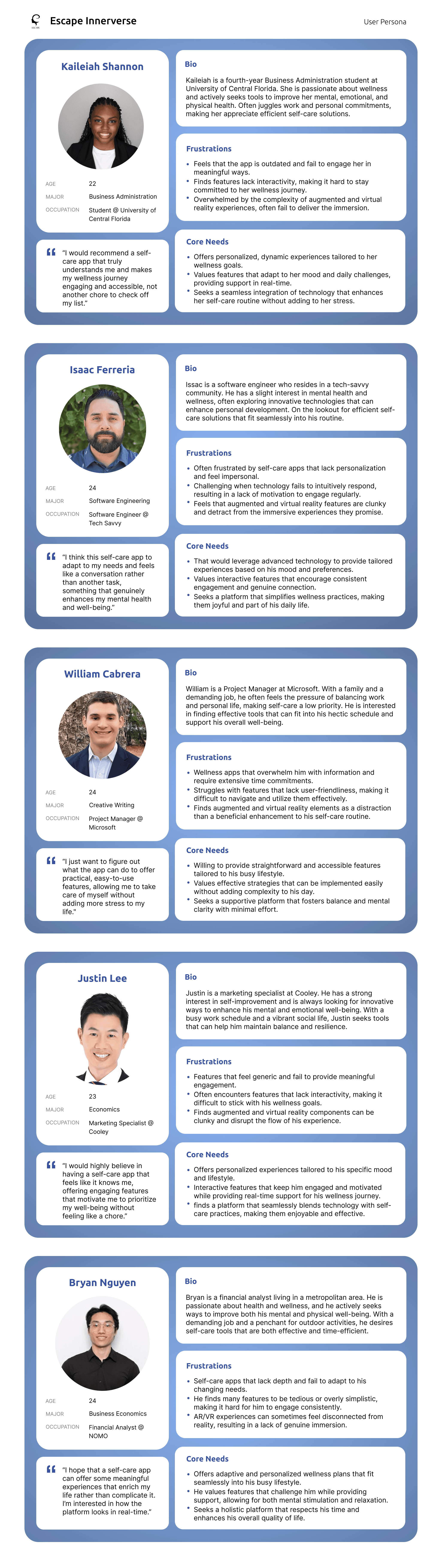
Based on the people we interviewed, user personas were created to understand the unique needs and challenges of the target audience — users. While some of their frustrations are related to the complexity of multiple platforms, which prompted the development of other features, their specific needs guided our research and design decisions in improving the Home, Mind, and Explore pages.
Based on the people we interviewed, user personas were created to understand the unique needs and challenges of the target audience — users. While some of their frustrations are related to the complexity of multiple platforms, which prompted the development of other features, their specific needs guided our research and design decisions in improving the Home, Mind, and Explore pages.
Competitive Analysis
I conducted a competitive analysis to evaluate existing products in the market. This research helped identify key features competitors excelled in and gaps where users faced friction.
Company
Company
Headspace

Calm
Gmail
Company
Calm
Strengths
High-quality sessions
Sleep support with calming soundscapes
User-friendly interface
Personalized recommendations based on preferences & activity
Strengths
Real-time communication
Customizable servers and channels
Strong community-building features
Integrations with various apps
Strengths
User-friendly interface
Meditation programs developed with clinical experts
Soothing audio and guided sessions
Structured courses for beginners
User-friendly interface
Robust email management features
Strong integration with other Google services
Advanced search functionality
High-quality sessions
Sleep support with calming soundscapes
User-friendly interface
Personalized recommendations based on preferences & activity
Weaknesses
Steeper learning curve for new users
May overwhelm new users with features
Not primarily designed for formal communication
Weaknesses
Limited collaboration tools compared to messaging apps
Can become cluttered with excessive emails
Less effective for real-time communication
Less clinical depth
Personalization can be limited
Subscription needed for many premium courses
Audio styles may not meet users' preferences
Weaknesses
Steeper learning curve for new users
May overwhelm new users with features
Not primarily designed for formal communication
Gmail
Features
Timer tools
Reminders and Streaks
Movement and mindful stretching sessions
Offline downloads
Features
Timer tools
Reminders and Streaks
Movement and mindful stretching sessions
Offline downloads
Timer tools
Reminders and Streaks
Movement and mindful stretching sessions
Offline downloads
Sleep content
Mood/stress tracking
Focus tools
Calm soundscapes
Offline downloads
Texting
Video chat
Server roles & permissions
Screen sharing
Bots and integrations
Features
Texting
Video chat
Server roles and permissions
Screen sharing
Bots and integrations
Company
Company

Innerworld

Replica
Gmail
Company
Replika
Strengths
Real-time communication
Customizable servers and channels
Strong community-building features
Integrations with various apps
Strengths
Real-time communication
Customizable servers and channels
Strong community-building features
Integrations with various apps
Strengths
Community-driven support
Invites exploration and personal connection
Intuitive UX with clear navigation
Strong community features that encourage collaboration
User-friendly interface
Robust email management features
Strong integration with other Google services
Advanced search functionality
Empathetic conversational AI that adapts to user tone
Easy onboarding and simple chat interface
Active focus on mental wellness features
Weaknesses
Steeper learning curve for new users
May overwhelm new users with features
Not primarily designed for formal communication
Weaknesses
Limited onboarding resources and tutorials
Sparse integrations with third-party tools and services
Inconsistent mobile experience compared to desktop
Inconsistent over long interactions
Privacy concerns around data collection and storage
Failure to retain long-term context across sessions
Weaknesses
Steeper learning curve for new users
May overwhelm new users with features
Not primarily designed for formal communication
Gmail
Features
Email management
Labels and filters
Integration with Google Workspace
Spam filtering
Features
24/7 access to anonymous
Event Calendars
Video Chat
Menu bubbles
Avatar-based group sessions
Email management
Labels and filters
Integration with Google Workspace
Spam filtering
Mini-games
Video chat
AI Chatbot
Scenario modes
Customizable avatar
Texting
Video chat
Server roles & permissions
Screen sharing
Bots and integrations
Features
Texting
Video chat
Server roles and permissions
Screen sharing
Bots and integrations
Goals
1) Implement the Home Page, Mind Section, & Explore Page that displays a futuristic interface that navigates the users to quickly access critical insights.
2) Assessing the app's responsiveness and fluidity. Verifying that all buttons and features function correctly upon interaction, and checking for any instances of freezing, glitching, or crashing.
2) Assessing the app's responsiveness and fluidity. Verifying that all buttons and features function correctly upon interaction, and checking for any instances of freezing, glitching, or crashing.
Ideations - High-fidelity Wireframes
Idea 1
Idea 1
Idea 2
Idea 2
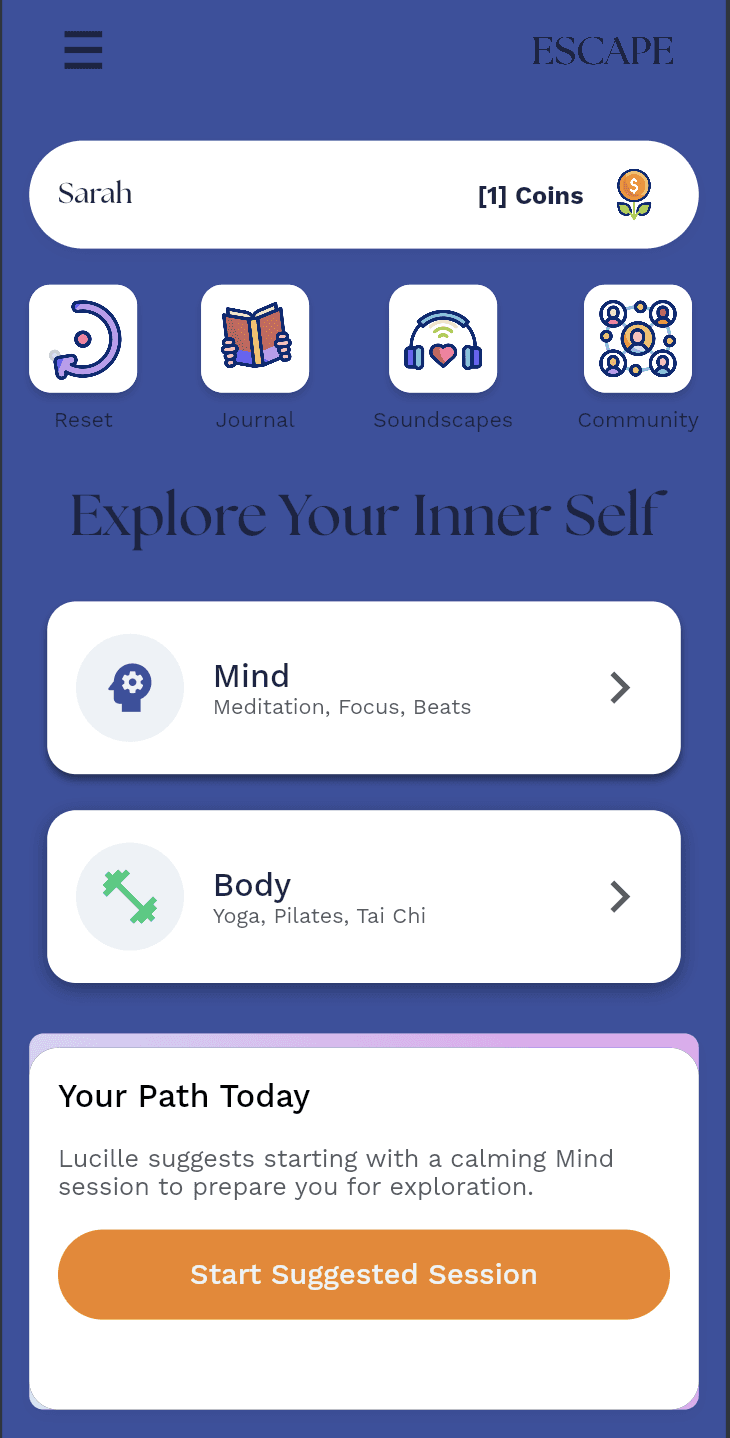
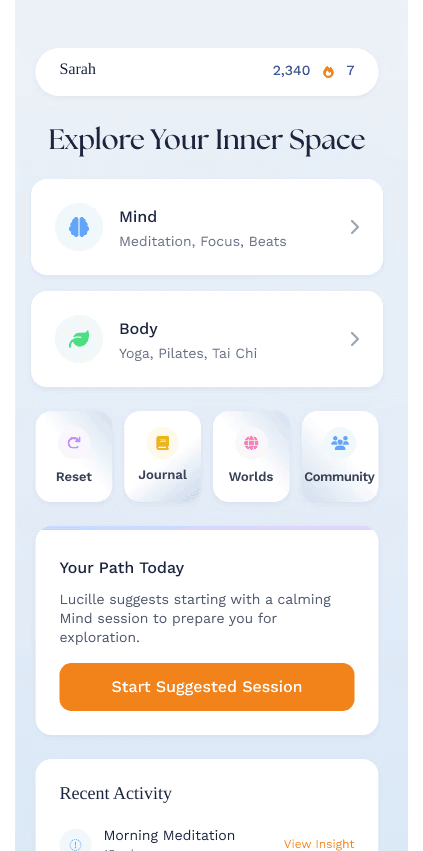
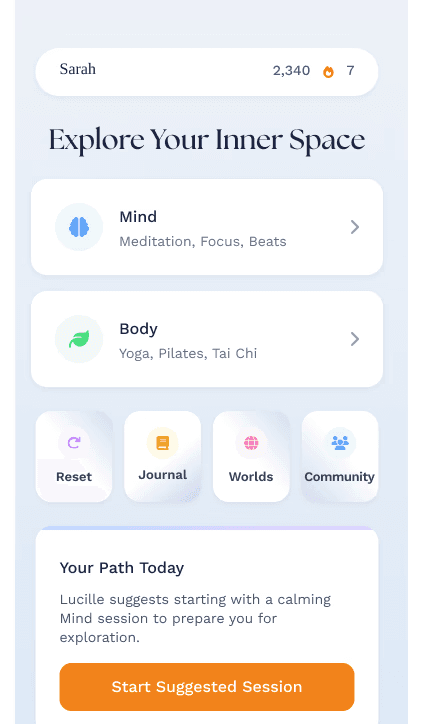
The Home page is designed to be the user’s starting point for self-care/wellness journeys that support their mental health. It quickly guides users toward actionable next steps, highlights progress, and connects them to the broader ecosystem.
Each field provides essential information for Home page:
Two prominent navigation sections:
Mind (Meditation, Focus, Beats)
Body (Yoga, Pilates, Tai Chi)
A row of compact tools for immediate use:
Reset (quick grounding / restart)
Journal (reflection)
Worlds (guided experiences / environments)
Community (support and connection)
Your Path Today” (Suggested Session):
Personalized guidance like:
“Lucille suggests starting with a calming Mind session…”
Includes a clear CTA button:
Start Suggested Session”
Helps users avoid decision fatigue and ensures they always have a “next best step.”
Each section acts as a direct pathway into a themed session library, making it easy for users to choose what they need right now.
The Home page is designed to be the user’s starting point for self-care/wellness journeys that support their mental health. It quickly guides users toward actionable next steps, highlights progress, and connects them to the broader ecosystem.
Each field provides essential information for Home page:
Two prominent navigation sections:
Mind (Meditation, Focus, Beats)
Body (Yoga, Pilates, Tai Chi)
A row of compact tools for immediate use:
Reset (quick grounding / restart)
Journal (reflection)
Worlds (guided experiences / environments)
Community (support and connection)
Your Path Today” (Suggested Session):
Personalized guidance like:
“Lucille suggests starting with a calming Mind session…”
Includes a clear CTA button:
Start Suggested Session”
Helps users avoid decision fatigue and ensures they always have a “next best step.”
Each section acts as a direct pathway into a themed session library, making it easy for users to choose what they need right now.
Idea 1
Idea 1
Idea 2
Idea 2
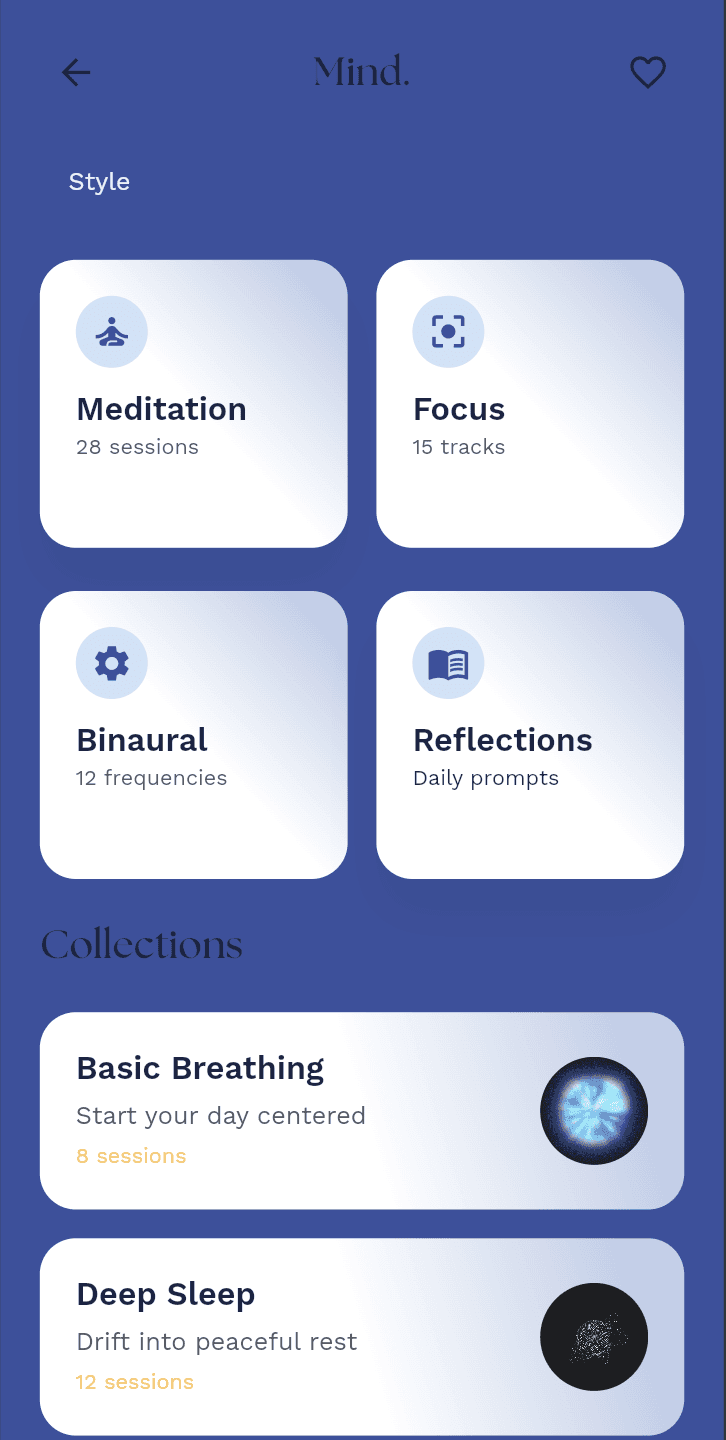
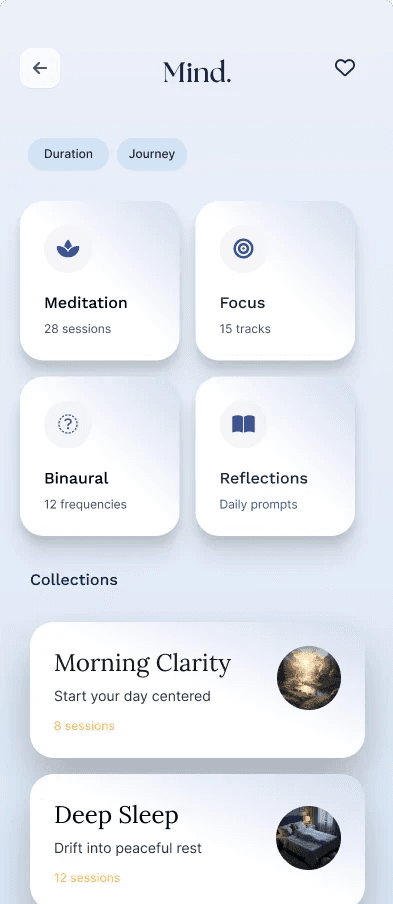
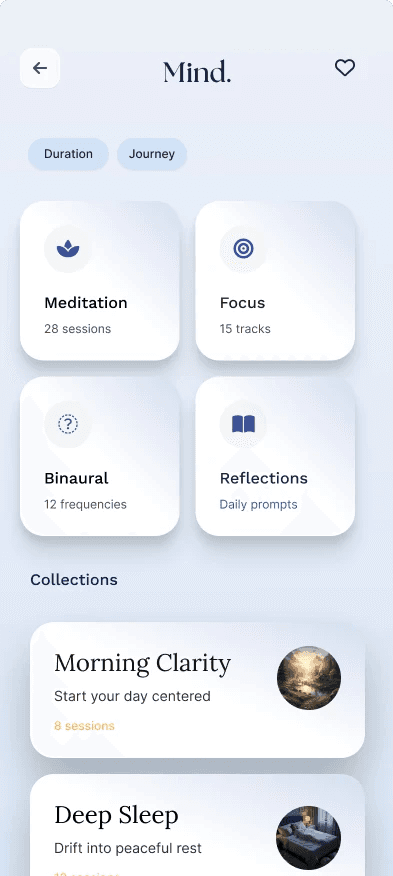
The Mind page is designed to help users explore mental wellness practices—especially those that support emotional regulation, focus, and relaxation. It empowers users to actively choose a mental state “journey” (calm, concentration, reflection, or sleep) and start practicing with minimal effort.
Each field provides essential information for Mind page:
These filters let users refine options:
Duration: find sessions that match time availability
Journey: group experiences by intent or pathway
Represents different practice types:
Meditation (“28 sessions”)
Focus (“15 tracks”)
Binaural (“12 frequencies”)
Reflections (“Daily prompts”)
Each collection includes a variety of quests:
Morning Clarity – start your day centered
Deep Sleep – drift into peaceful rest
Stress Relief – release tension & anxiety
Gratitude Flow – cultivate appreciation
Users can choose based on how they feel—restless, stressed, distracted, or reflective—rather than searching through long lists. The collections provide guided structure, making mental wellness feel more approachable and less overwhelming.
The Mind page is designed to help users explore mental wellness practices—especially those that support emotional regulation, focus, and relaxation. It empowers users to actively choose a mental state “journey” (calm, concentration, reflection, or sleep) and start practicing with minimal effort.
Each field provides essential information for Mind page:
These filters let users refine options:
Duration: find sessions that match time availability
Journey: group experiences by intent or pathway
Represents different practice types:
Meditation (“28 sessions”)
Focus (“15 tracks”)
Binaural (“12 frequencies”)
Reflections (“Daily prompts”)
Each collection includes a variety of quests:
Morning Clarity – start your day centered
Deep Sleep – drift into peaceful rest
Stress Relief – release tension & anxiety
Gratitude Flow – cultivate appreciation
Users can choose based on how they feel—restless, stressed, distracted, or reflective—rather than searching through long lists. The collections provide guided structure, making mental wellness feel more approachable and less overwhelming.
Idea 1
Idea 1
Idea 2
Idea 2
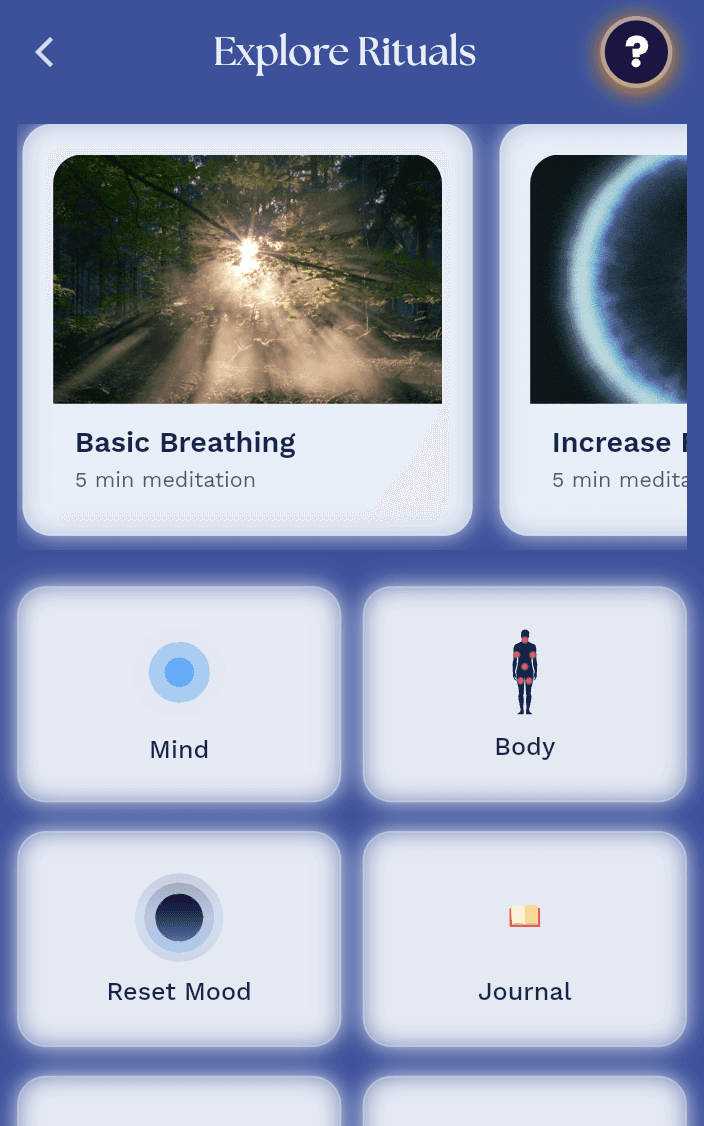
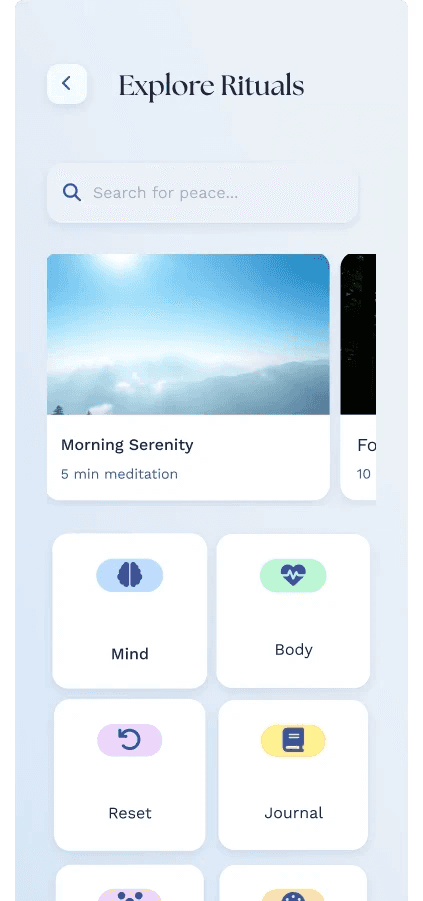
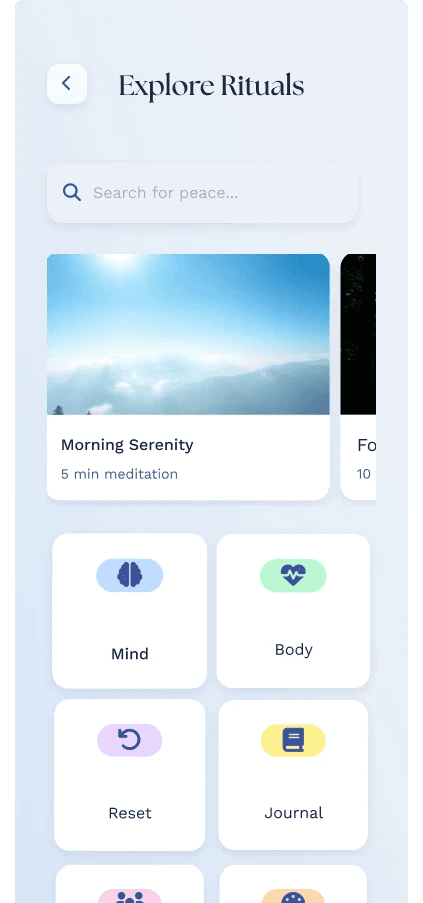
The Explore page is designed to help users discover and investigate wellness “rituals” that match what they need mentally right now. Instead of forcing users into one fixed path, it supports browsing, searching, and learning—so users can actively choose approaches that reduce stress, improve focus, or help them feel supported.
Each field provides essential information for Explore page:
Search Bar:
Lets users type keywords (e.g., stress, sleep, calm, anxiety).
For You sections that are suggested:
Morning Serenity
Basic Breathing
Evening Calm
Garden Flow
Daily Grace
Night Rest
Core journeys/tools:
Mind
Body
Reset
Journal
Connect
Quests
Heal
Habits
“Let Lucille Choose For Me” CTA:
Lucille(An AI Assistant) selects a ritual based on context/preferences
The search bar empowers users with control, especially when they already know what they’re looking for emotionally. These featured recommendations help users when they’re overwhelmed or unsure what to do next, which is supporting consistency in self-care. Lucille directly fights decision fatigue and supports users who need guidance rather than browsing.
The Explore page is designed to help users discover and investigate wellness “rituals” that match what they need mentally right now. Instead of forcing users into one fixed path, it supports browsing, searching, and learning—so users can actively choose approaches that reduce stress, improve focus, or help them feel supported.
Each field provides essential information for Explore page:
Search Bar:
Lets users type keywords (e.g., stress, sleep, calm, anxiety).
For You sections that are suggested:
Morning Serenity
Basic Breathing
Evening Calm
Garden Flow
Daily Grace
Night Rest
Core journeys/tools:
Mind
Body
Reset
Journal
Connect
Quests
Heal
Habits
“Let Lucille Choose For Me” CTA:
Lucille(An AI Assistant) selects a ritual based on context/preferences
The search bar empowers users with control, especially when they already know what they’re looking for emotionally. These featured recommendations help users when they’re overwhelmed or unsure what to do next, which is supporting consistency in self-care. Lucille directly fights decision fatigue and supports users who need guidance rather than browsing.
Usability Testing
I conducted multiple usability testing to determine the optimal layout and possible design changes.
I conducted multiple usability testing to determine the optimal layout and possible design changes.
1st Design
Idea 1
Final Design
Idea 2
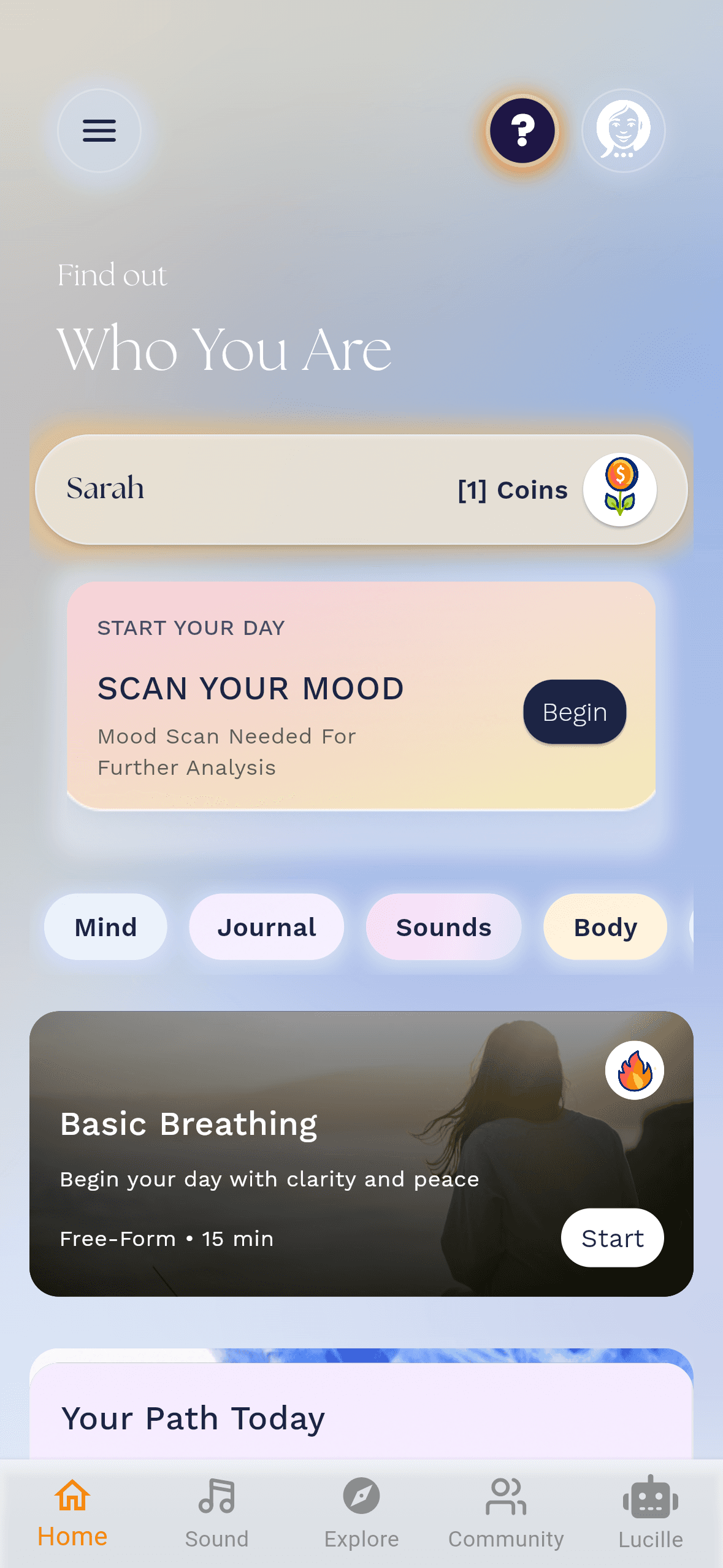
Based on the usability testing that I conducted for the Home page, there were many changes that I implemented that better meet users’ needs. Users mentioned that the earlier Home layout sometimes required too much effort to figure out what to do next, and it could feel less interactive and personalized when they were unsure of their current mental state. I focused on making the Home page feel more intuitive, supportive, and action-oriented so users could begin self-care quickly.
The newest Home page design is the one that added “Scan Your Mood” through a futuristic platform. Users responded well to this feature because it gives them an immediate starting point and makes the app feel like it is actively adapting to their emotions. Instead of users having to decide whether they should meditate, journal, or try another activity, the mood scan helps guide them toward further analysis and the most appropriate next step. This also made users feel more understood, since the experience begins with their current mental state rather than a generic recommendation.
Users mentioned that mood scan felt engaging and modern, and it made the Home page feel less overwhelming. They also appreciated that the interface clearly communicated what to do next through the “Begin” call-to-action, which reduced confusion and increased confidence to start. In addition, the “Scan Your Mood” feature strengthened the sense of personalization on the Home page, which improved user motivation to continue exploring other wellness journeys right after completing the scan.
Based on the usability testing that I conducted for the Home page, there were many changes that I implemented that better meet users’ needs. Users mentioned that the earlier Home layout sometimes required too much effort to figure out what to do next, and it could feel less interactive and personalized when they were unsure of their current mental state. I focused on making the Home page feel more intuitive, supportive, and action-oriented so users could begin self-care quickly.
The newest Home page design is the one that added “Scan Your Mood” through a futuristic platform. Users responded well to this feature because it gives them an immediate starting point and makes the app feel like it is actively adapting to their emotions. Instead of users having to decide whether they should meditate, journal, or try another activity, the mood scan helps guide them toward further analysis and the most appropriate next step. This also made users feel more understood, since the experience begins with their current mental state rather than a generic recommendation.
Users mentioned that mood scan felt engaging and modern, and it made the Home page feel less overwhelming. They also appreciated that the interface clearly communicated what to do next through the “Begin” call-to-action, which reduced confusion and increased confidence to start. In addition, the “Scan Your Mood” feature strengthened the sense of personalization on the Home page, which improved user motivation to continue exploring other wellness journeys right after completing the scan.
1st Design
Idea 1
Final Design
Idea 2
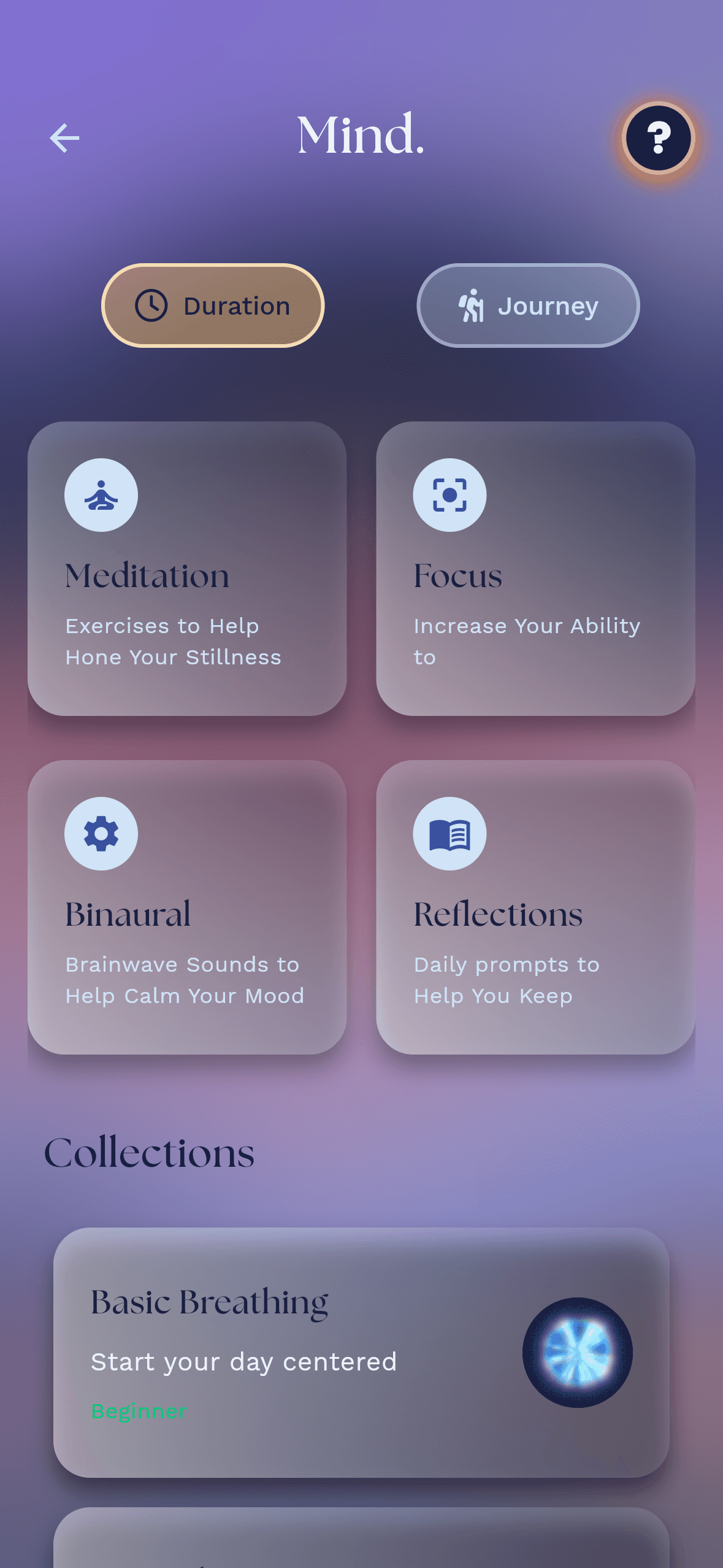
Through the usability testing step that I conducted for the Mind page, there were many changes that I implemented that better meet users’ needs. Users mentioned that navigating previous versions felt confusing at times because there were too many options, and it wasn’t always clear which designs would be most attractive depending on what they wanted it to look. I redesigned it to be more intuitive, easier to scan, and more motivating to use.
The newest design is added with a futuristic and unique platform. Users responded positively to this change because the overall visual style made the page feel more engaging and modern, which helped reduce the clinical feel some wellness tools can have. They stated that the futuristic theme made the page feel like a guided experience rather than just a list of meditation options, which improved their willingness to explore.
Users felt the filters made it easier to find something that matched their time and mood. This helped them start more confidently, especially when they were short on time or feeling overwhelmed. Many users also mentioned that the grid of practice sections (such as Meditation, Focus, Binaural, and Reflections) made the page easier to understand at a glance, because each option communicates its purpose clearly.
Through the usability testing step that I conducted for the Mind page, there were many changes that I implemented that better meet users’ needs. Users mentioned that navigating previous versions felt confusing at times because there were too many options, and it wasn’t always clear which designs would be most attractive depending on what they wanted it to look. I redesigned it to be more intuitive, easier to scan, and more motivating to use.
The newest design is added with a futuristic and unique platform. Users responded positively to this change because the overall visual style made the page feel more engaging and modern, which helped reduce the clinical feel some wellness tools can have. They stated that the futuristic theme made the page feel like a guided experience rather than just a list of meditation options, which improved their willingness to explore.
Users felt the filters made it easier to find something that matched their time and mood. This helped them start more confidently, especially when they were short on time or feeling overwhelmed. Many users also mentioned that the grid of practice sections (such as Meditation, Focus, Binaural, and Reflections) made the page easier to understand at a glance, because each option communicates its purpose clearly.
1st Design
Idea 1
Final Design
Idea 2
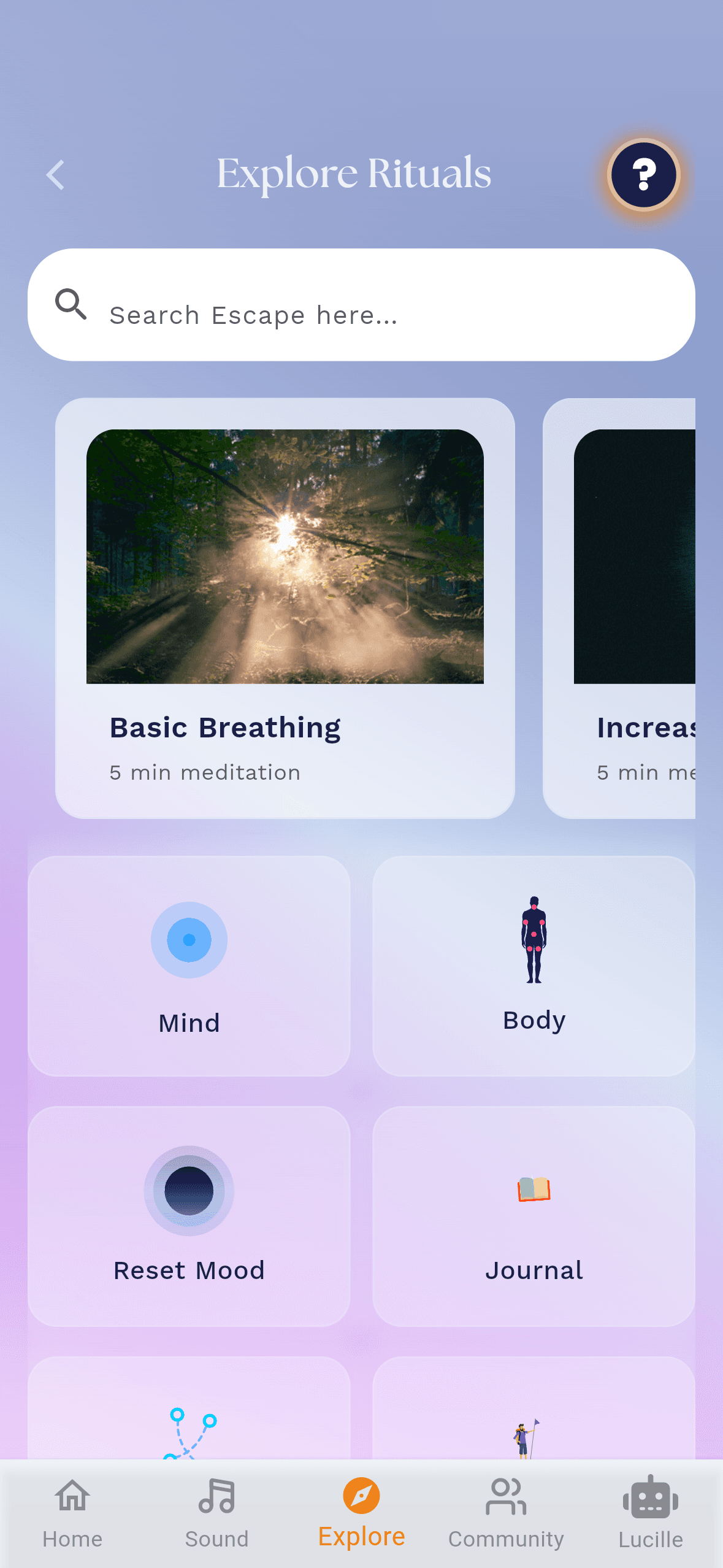
During the usability testing phase, users mentioned that the previous Explore layout sometimes felt overwhelming, and it could be difficult to know what to do first when they were looking for a wellness activity quickly. Improving the Explore experience to make it feel more engaging.
This latest version adds a glowy and futuristic look with interactive features. Users responded positively to this visual direction because it felt more modern and alive, which increased their motivation to explore. They noted that the glowing design and interactive elements helped them understand that explore is meant for discovery, rather than just selecting one fixed routine.
The interactive feel of the explore ritual section helped users scan content more easily. users also said that the futuristic theme made the Explore page more enjoyable, which made it easier for them to try new activities instead of sticking to the same option every time.
During the usability testing phase, users mentioned that the previous Explore layout sometimes felt overwhelming, and it could be difficult to know what to do first when they were looking for a wellness activity quickly. Improving the Explore experience to make it feel more engaging.
This latest version adds a glowy and futuristic look with interactive features. Users responded positively to this visual direction because it felt more modern and alive, which increased their motivation to explore. They noted that the glowing design and interactive elements helped them understand that explore is meant for discovery, rather than just selecting one fixed routine.
The interactive feel of the explore ritual section helped users scan content more easily. users also said that the futuristic theme made the Explore page more enjoyable, which made it easier for them to try new activities instead of sticking to the same option every time.
Design Solution - Problem
The "Basic Breathing" (Mind Section) is a fundamental core feature provides a beginner-friendly practice that helps users learn deep breathing right away. It works as a reliable starting point for users who feel stressed or unsure what to do, reducing the time spent searching for the right wellness option. This makes the Mind experience both accessible and actionable, increasing the chance users will complete a wellness journey successfully.
Escape’s new design centered around the “Scan Your Mood” experience. This is another core feature that quickly helps users identify how they feel in the moment and then directs them toward further wellness support. By turning the beginning of the app into an interactive, personalized step, the design reduces confusion about what to do next. Users can start immediately through a clear call-to-action, which lowers friction and encourages engagement. The mood-based results also make the experience feel more relevant and motivating, rather than generic. Scan Your Mood feature became the newest heart of Escape’s onboarding and personalization flow.
Overall, users needed clearer guided paths to start using the app. The updated layout and interactive features reduce confusion and help users quickly find support that matches their current needs. This is meant to make the experience feel more personalized, easier to navigate, and more motivating to use consistently.
The "Basic Breathing" (Mind Section) is a fundamental core feature provides a beginner-friendly practice that helps users learn deep breathing right away. It works as a reliable starting point for users who feel stressed or unsure what to do, reducing the time spent searching for the right wellness option. This makes the Mind experience both accessible and actionable, increasing the chance users will complete a wellness journey successfully.
Escape’s new design centered around the “Scan Your Mood” experience. This is another core feature that quickly helps users identify how they feel in the moment and then directs them toward further wellness support. By turning the beginning of the app into an interactive, personalized step, the design reduces confusion about what to do next. Users can start immediately through a clear call-to-action, which lowers friction and encourages engagement. The mood-based results also make the experience feel more relevant and motivating, rather than generic. Scan Your Mood feature became the newest heart of Escape’s onboarding and personalization flow.
Overall, users needed clearer guided paths to start using the app. The updated layout and interactive features reduce confusion and help users quickly find support that matches their current needs. This is meant to make the experience feel more personalized, easier to navigate, and more motivating to use consistently.
Impacts
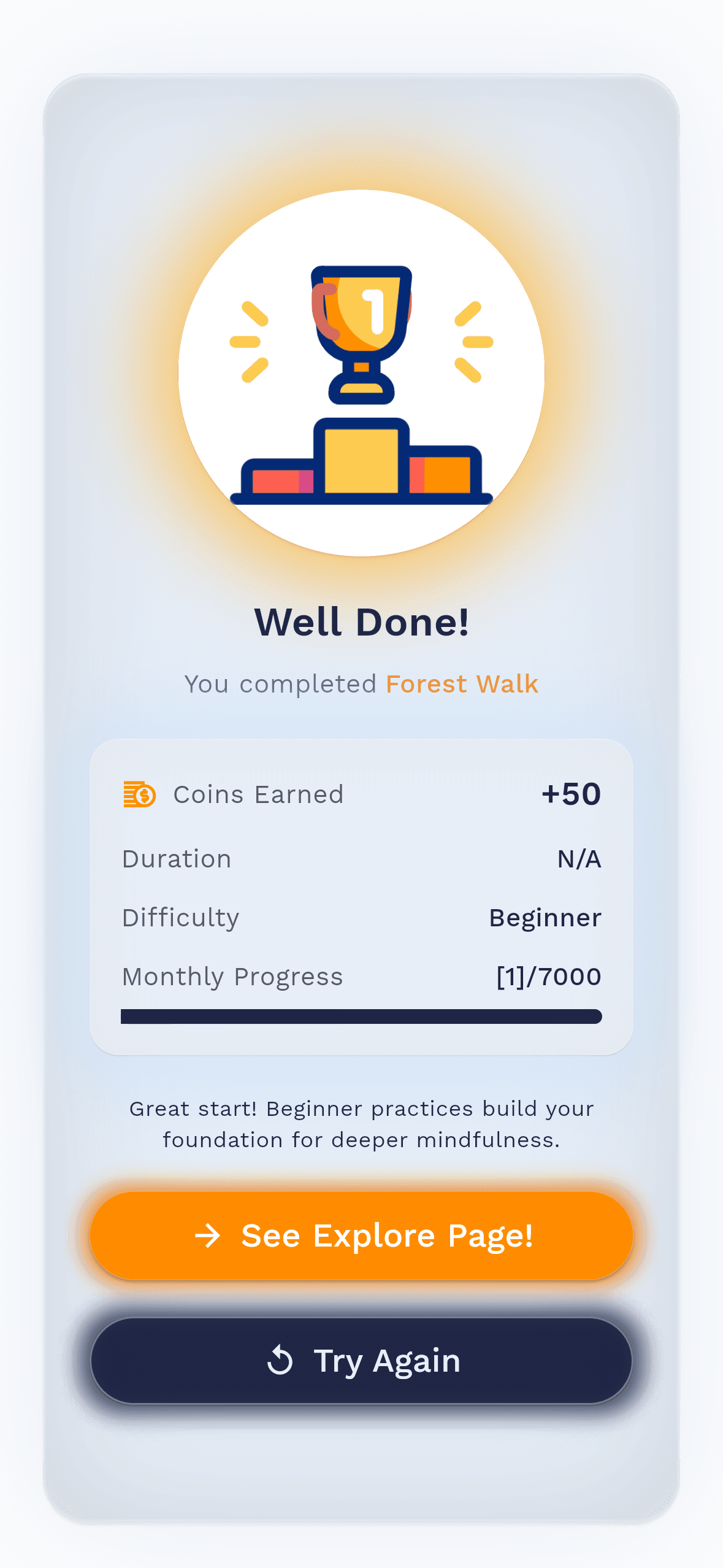
I observed a 95% increase in the task success rate, specifically when selecting a meditation ritual to learn how to take deep breaths. Users were able to quickly access the correct ritual and follow through the wellness journey without errors. By simplifying these critical workflows, the updated design reduced confusion and made it easier for users to stay on track from selection to completion.
I observed a 95% increase in the task success rate, specifically when selecting a meditation ritual to learn how to take deep breaths. Users were able to quickly access the correct ritual and follow through the wellness journey without errors. By simplifying these critical workflows, the updated design reduced confusion and made it easier for users to stay on track from selection to completion.
Reflection
Takeaways from my experiences
1) Purpose & Reason: Implementing a feature
1) Purpose & Reason: Implementing a feature
1) Purpose & Reason: Implementing a feature
Takeaways
The features help users find the right wellness support quickly and feel confident. The core features such as, Scan Your Mood and the Basic Breathing (Mind Section), These were implemented to reduce confusion, shorten the time to begin, and improve completion rates in guided wellness journeys. It also focuses on making wellness feel personalized, engaging, and easy to act on.
2) Developing the platforms
2) Developing the platforms
The platforms provide a smooth navigation and decision-making by using clear pathways from discovery to start. The Mind, Explore, and other sections were designed around structured routines, like journeys and guided practices, so that users know what step comes next. We also refined visual and interactive elements to improve engagement, making the app feel more interactive rather than overwhelming. Through iterative usability testing, we ensured the platform supports users from selection through completion with minimal errors.
Planned Initiatives
Planned Initiatives
Improve the onboarding flow so users understand what to do next within the first few screens
Analyze user interactions to identify pain points and areas for improvement
Add guided prompts for selecting routines (e.g., mood, duration, or goals)
Optimize navigation and filtering to reduce time-to-action and decision fatigue
Research best practices in data visualization to enhance design quality
Refine completion feedback (progress, rewards, and next steps) to motivate users to return
Use both qualitative and quantitative methods to gather comprehensive feedback
Analyze user interactions to identify pain points and areas for improvement
Create wireframes or prototypes to visualize potential design changes
Research best practices in data visualization to enhance design quality
Test on various screen sizes to guarantee a consistent experience on mobile, tablet, and desktop
Improve the onboarding flow so users understand what to do next within the first few screens
Analyze user interactions to identify pain points and areas for improvement
Add guided prompts for selecting routines (e.g., mood, duration, or goals)
Optimize navigation and filtering to reduce time-to-action and decision fatigue
Research best practices in data visualization to enhance design quality
Refine completion feedback (progress, rewards, and next steps) to motivate users to return
©2026 Andrew Wong. All rights reserved.