



Neoboard

Neoboard

Neoboard

UI Design | UX Research | System Thinking | Product Design

Designing for Education:

Bridging Functionality & Simplicity

Roles

Roles

Roles

UX Designer UX Researcher

Tools

Tools

Tools

Figma
Maze

Timeline

Timeline

Timeline

May 2025 - August 2025

May 2025 - August 2025

Teammates

Teammates

Teammates

Dr. Mora

Edlyn Liang

Dr. Mora

Edlyn Liang

Overview

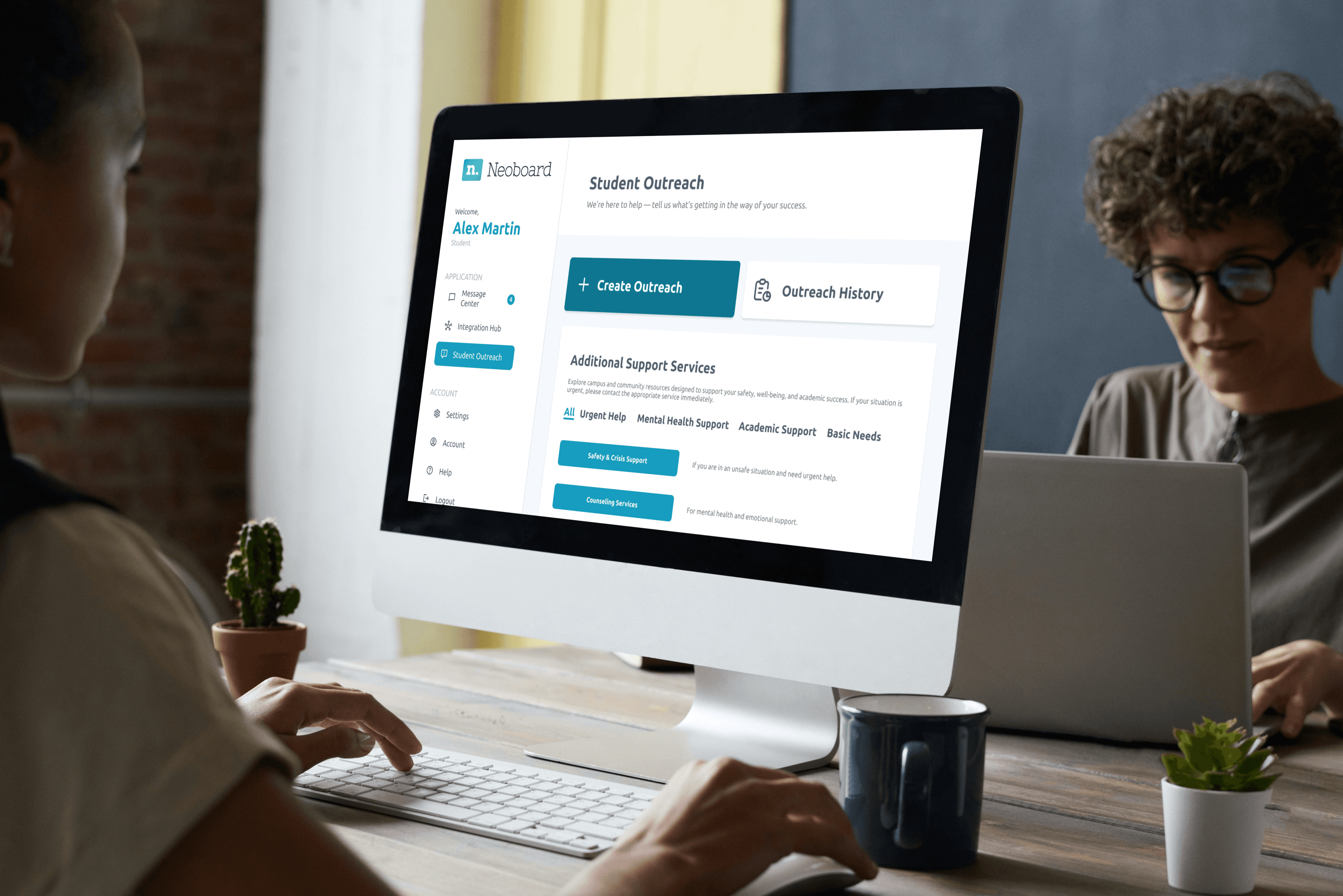
NeoBoard is a forward-thinking educational technology company dedicated to empowering educators and administrators to support student success, particularly for underrepresented students. I joined the team in May as a UI/UX design intern, focusing on developing new features for the site. This case study explores my role in designing NeoBoard’s user interface, specifically creating an Outreach Form, Outreach History, & Additional Support Services system to simplify navigation and enhance the user experience.

NeoBoard is a forward-thinking educational technology company dedicated to empowering educators and administrators to support student success, particularly for underrepresented students. I joined the team in May as a UI/UX design intern, focusing on developing new features for the site. This case study explores my role in designing NeoBoard’s user interface, specifically creating an Outreach Form, Outreach History, & Additional Support Services system to simplify navigation and enhance the user experience.

NeoBoard is a forward-thinking educational technology company dedicated to empowering educators and administrators to support student success, particularly for underrepresented students. I joined the team in May as a UI/UX design intern, focusing on developing new features for the site. This case study explores my role in designing NeoBoard’s user interface, specifically creating an Outreach Form, Outreach History, & Additional Support Services system to simplify navigation and enhance the user experience.

Problems

1) While the platform offers a range of comprehensive functionalities — including a Create Outreach Form & Outreach History — these features are scattered. This fragmentation makes it challenging for students and instructors to quickly access and act on critical information.

1) While the platform offers a range of comprehensive functionalities — including a Create Outreach Form, Outreach History, and Additional Support Services — these features are scattered. This fragmentation makes it challenging for students to quickly access and act on critical information.

1) While the platform offers a range of comprehensive functionalities — including a Create Outreach Form & Outreach History — these features are scattered. This fragmentation makes it challenging for students and instructors to quickly access and act on critical information.

2) Based on user interviews, it became clear that students want to have a fast channel to connect and access on-demand meetings with faculties, so that they can be used across classes. I realized that the lack of a standardized system for easily waiting for Outreach forms to be reviewed. This oftentimes causes the instructors to spend more time on reviewing students' Outreach forms.

2) Based on user interviews, it became clear that students want to have a fast channel to connect and access on-demand meetings with faculties, so that they can be used across classes. I realized that the lack of a standardized system for easily waiting for Outreach forms to be reviewed. This oftentimes causes the instructors to spend more time on reviewing students' Outreach forms.

Research - User Interviews

Since we are designing for students & educators, our team conducted 8 interviews with students & instructors from a diverse range of schools, learning and teaching various subjects to gain a deep understanding of the instructors' workflows and challenges. Below are some key takeaways from these user interviews that informed the design of the Student Outreach form, Outreach history, & Additional Support Services.

Since we are designing for students & educators, our team conducted 8 interviews with students & instructors from a diverse range of schools, learning and teaching various subjects to gain a deep understanding of the instructors' workflows and challenges. Below are some key takeaways from these user interviews that informed the design of the Student Outreach form, Outreach history, & Additional Support Services.

Pain Points

80% of students expressed a need for video call or meeting options to discuss concerns more personally.


70% of students feel unclear about how reported cases are resolved, leading to anxiety in using reporting tools.


65% of students believe that the existing reporting categories do not adequately address their specific issues.


75% of instructors and students find it frustrating that students cannot easily indicate their availability for meetings, complicating support coordination.


60% of instructors express neutrality toward adopting new systems, as they feel comfortable with existing platforms like Canvas and Gmail.


50% of students indicate that external factors, such as family issues, impact their mental health more significantly than academic assignments.

Research - User Personas
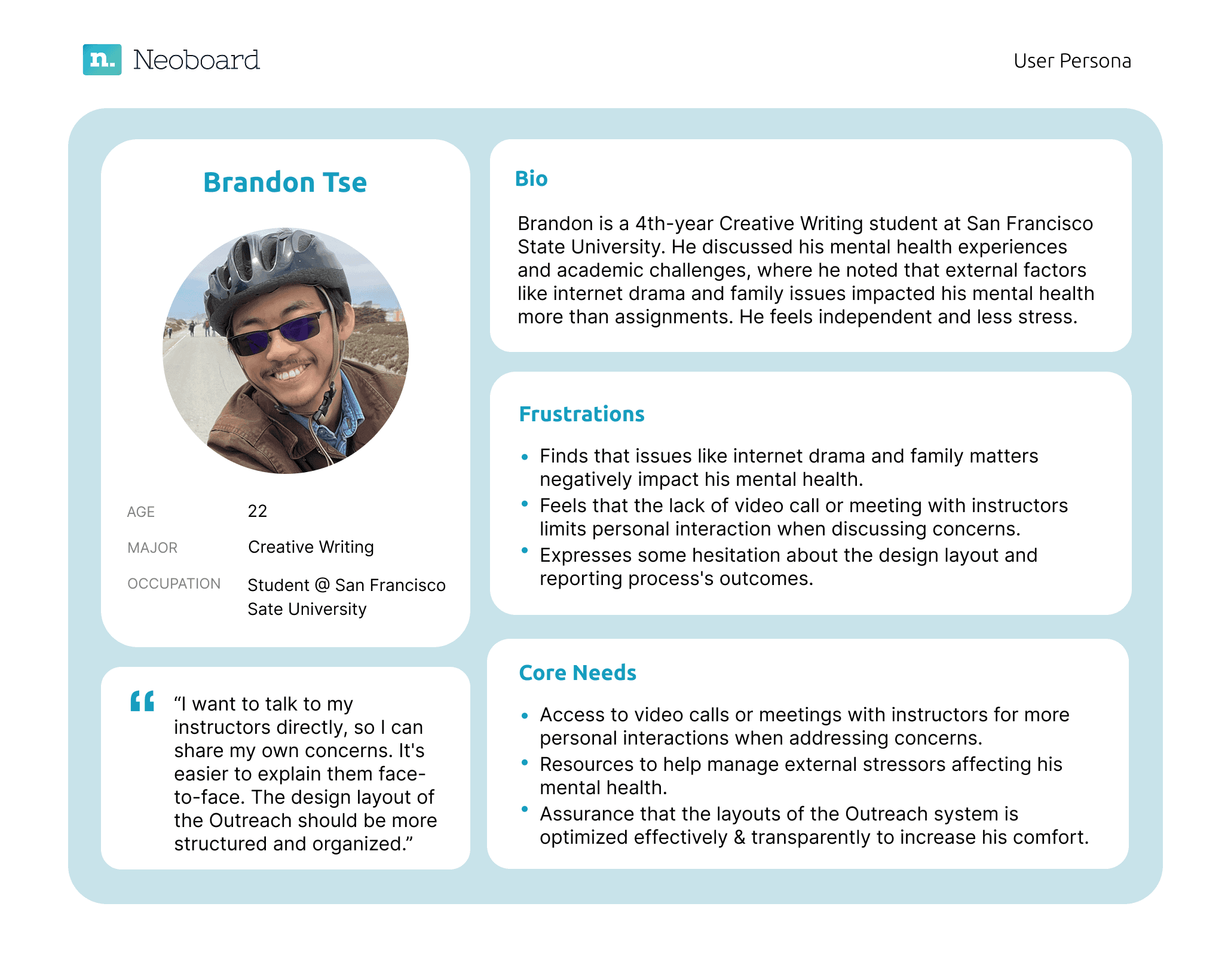
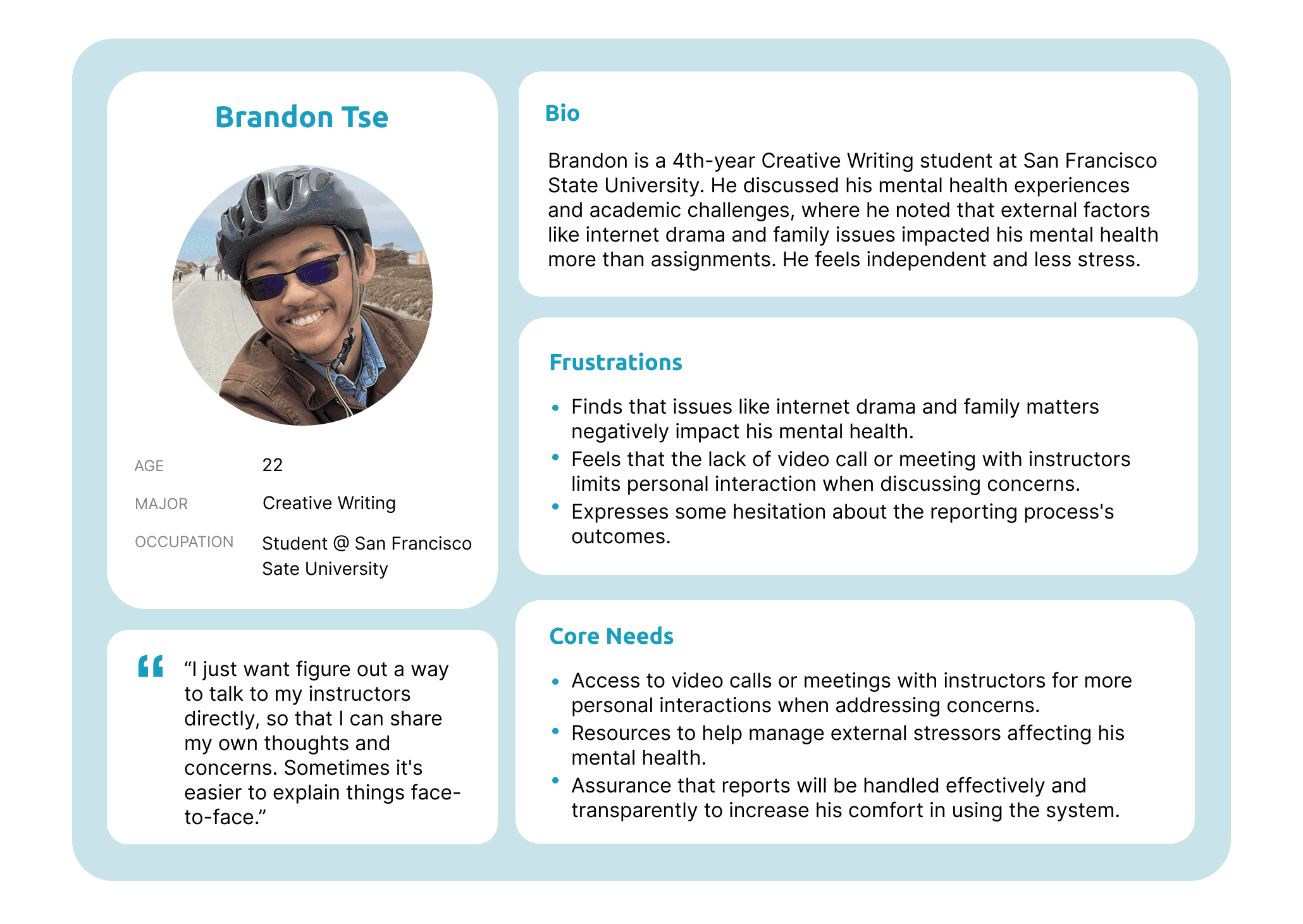
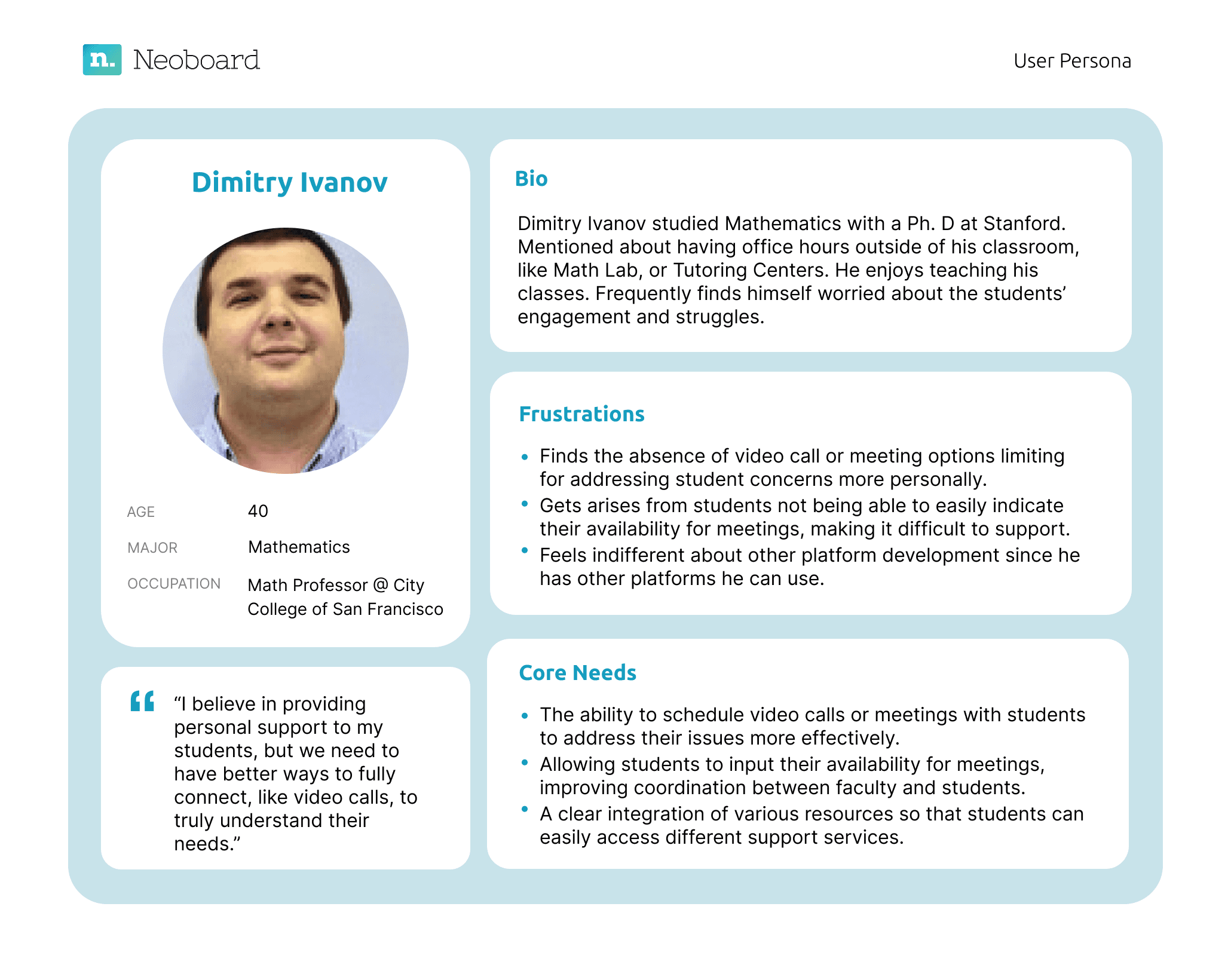
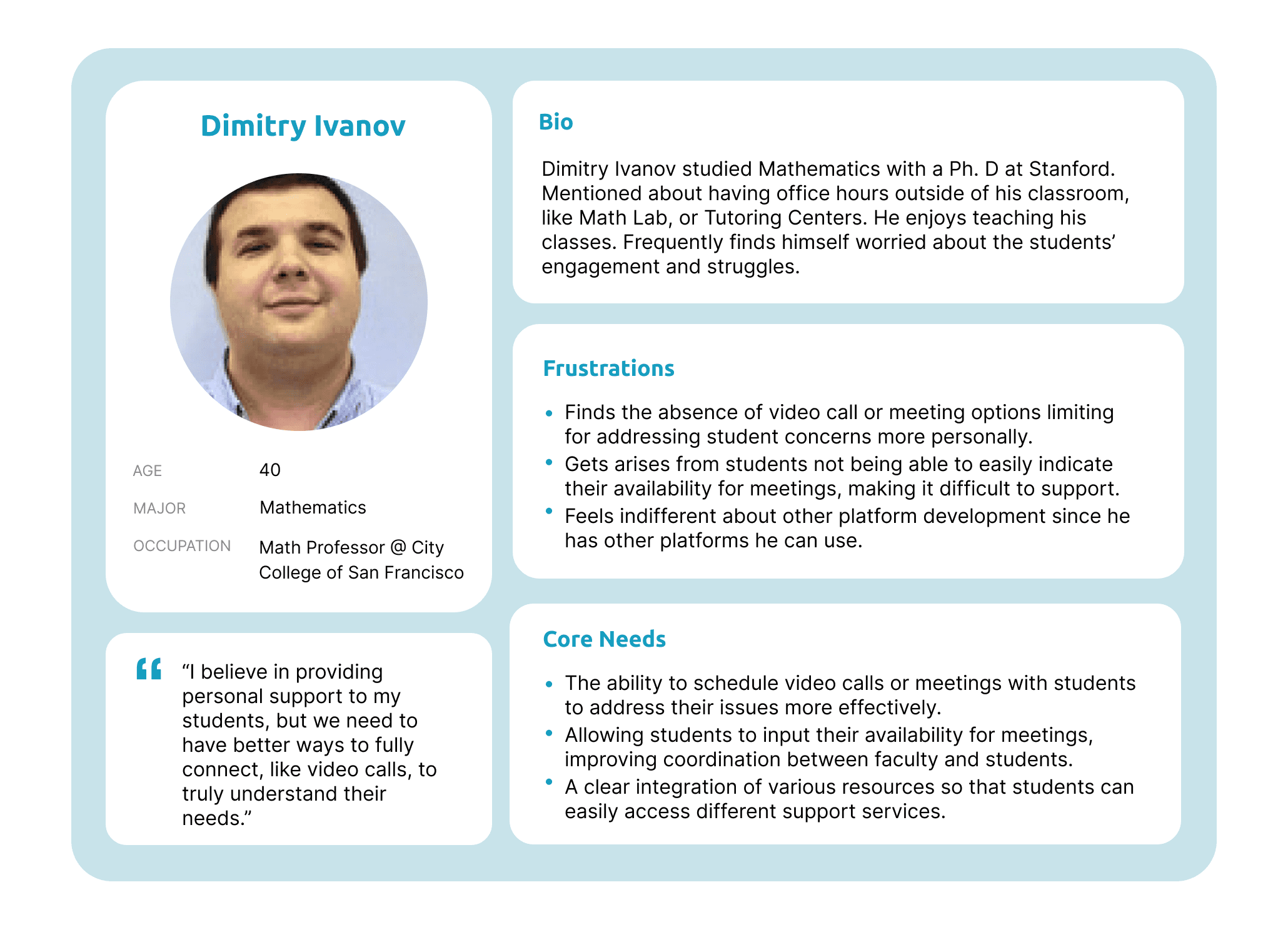
Based on the people we interviewed, user personas were created to understand the unique needs and challenges of the target audience — educators. While some of their frustrations are related to the complexity of multiple platforms, which prompted the development of other features, their specific needs guided our design decisions in developing a Student Outreach system and additional services.

Based on the people we interviewed, user personas were created to understand the unique needs and challenges of the target audience — educators. While some of their frustrations are related to the complexity of multiple platforms, which prompted the development of other features, their specific needs guided our design decisions in developing a Student Outreach system and additional services.

Competitive Analysis

I conducted a competitive analysis to evaluate existing products in the market. This research helped identify key features competitors excelled in and gaps where users faced friction.‍

Company

Company

Gmail

Discord

Gmail

Company

Discord

Strengths

  • Real-time communication

  • Customizable servers and channels

  • Strong community-building features

  • Integrations with various apps


Strengths

  • Real-time communication

  • Customizable servers and channels

  • Strong community-building features

  • Integrations with various apps


Strengths

  • User-friendly interface

  • Robust email management features

  • Strong integration with other Google services

  • Advanced search functionality

  • User-friendly interface

  • Robust email management features

  • Strong integration with other Google services

  • Advanced search functionality

  • Real-time communication

  • Customizable servers and channels

  • Strong community-building features

  • Integrations with various apps


Weaknesses

  • Steeper learning curve for new users

  • May overwhelm new users with features

  • Not primarily designed for formal communication


Weaknesses

  • Limited collaboration tools compared to messaging apps

  • Can become cluttered with excessive emails

  • Less effective for real-time communication

  • Steeper learning curve for new users

  • May overwhelm new users with features

  • Not primarily designed for formal communication


Weaknesses

  • Steeper learning curve for new users

  • May overwhelm new users with features

  • Not primarily designed for formal communication


Gmail

Features

  • Email management

  • Labels and filters

  • Integration with Google Workspace

  • Spam filtering

Features

  • Email management

  • Labels and filters

  • Integration with Google Workspace

  • Spam filtering

  • Email management

  • Labels and filters

  • Integration with Google Workspace

  • Spam filtering

  • Texting

  • Video chat

  • Server roles and permissions

  • Screen sharing

  • Bots and integrations

  • Texting

  • Video chat

  • Server roles & permissions

  • Screen sharing

  • Bots and integrations

Features

  • Texting

  • Video chat

  • Server roles and permissions

  • Screen sharing

  • Bots and integrations

Goals

1) Create an Outreach system that displays essential information and allows students to raise concerns in or outside of classroom, where faculties can quickly access critical insights.

2) Develop a Join Office Hours page to simplify urgent/immediate sources and reduce time in waiting for Outreach concerns to be reviewed by faculties.

2) Develop a Join Office Hours page to simplify urgent/immediate sources and reduce time in waiting for Outreach concerns to be reviewed by faculties.

Ideations - low-fidelity Wireframes
Idea 1

Idea 1


Idea 2

Idea 2


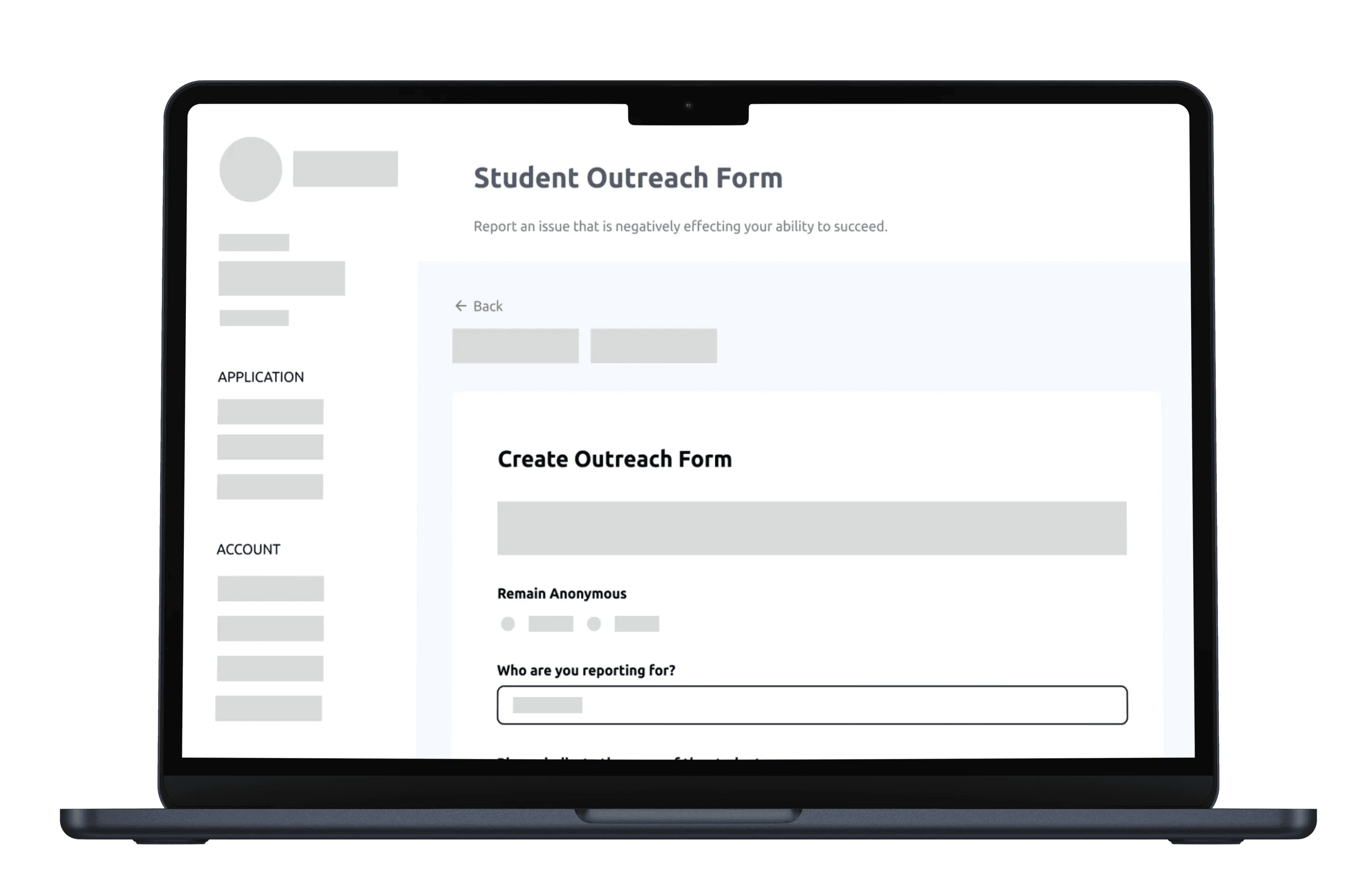
We want to organize the layout efficiently and ensure that it addresses users' concern, but one of the biggest constraints was designing the Student Outreach within the limitations of the app’s existing functionality, which restricted certain design possibilities.


I created different iterations through low-fidelity wireframes and explored various functional layouts and features. Here are some of the areas that I considered while designing these low-fi wireframes:


  • Making sure that the categories of the outreach form is present to allow students to indicate the issue/concerns, since students mentioned in the interviews that they want to make it look simple and easy to use when instructors receive the student's outreach


  • Including some daily and most-used functions (eg. Create Outreach, Outreach History) so that it is easier for users to organize and navigate their work


We want to organize the layout efficiently and ensure that it addresses users' concern, but one of the biggest constraints was designing the Student Outreach within the limitations of the app’s existing functionality, which restricted certain design possibilities.

I created different iterations through low-fidelity wireframes and explored various functional layouts and features. Here are some of the areas that I considered while designing these low-fi wireframes:

• Making sure that the categories of the outreach form is present to allow students to indicate the issue/concerns, since students mentioned in the interviews that they want to make it look simple and easy to use when instructors receive the student's outreach

• Including some daily and most-used functions (eg. Create Outreach, Outreach History) so that it is easier for users to organize and navigate their work


We want to organize the layout efficiently and ensure that it addresses users' concern, but one of the biggest constraints was designing the Student Outreach within the limitations of the app’s existing functionality, which restricted certain design possibilities.


I created different iterations through low-fidelity wireframes and explored various functional layouts and features. Here are some of the areas that I considered while designing these low-fi wireframes:


  • Making sure that the categories of the outreach form is present to allow students to indicate the issue/concerns, since students mentioned in the interviews that they want to make it look simple and easy to use when instructors receive the student's outreach


  • Including some daily and most-used functions (eg. Create Outreach, Outreach History) so that it is easier for users to organize and navigate their work


Ideations - High-fidelity Wireframes
Idea 1

Idea 1


Idea 2

Idea 2


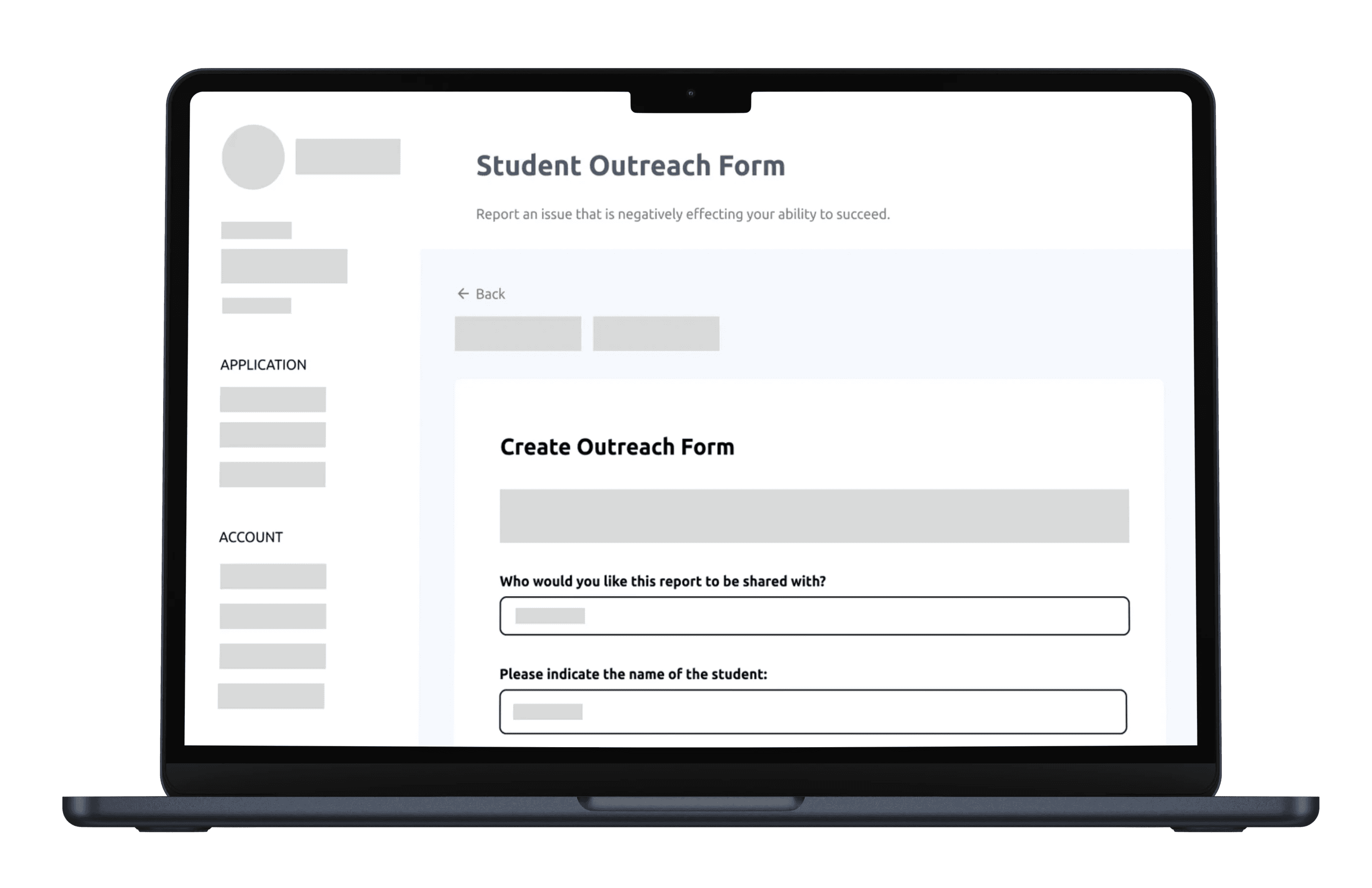
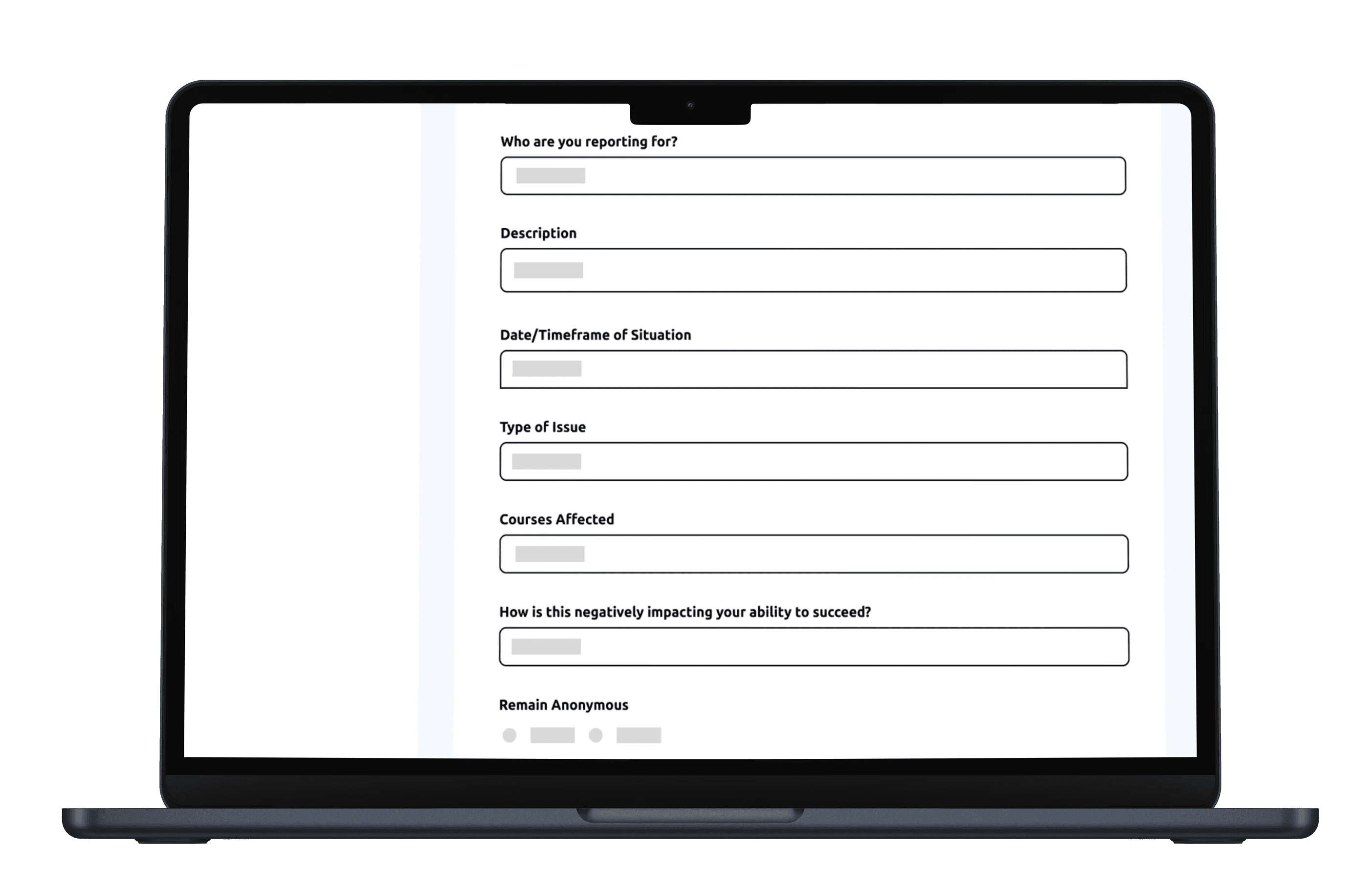
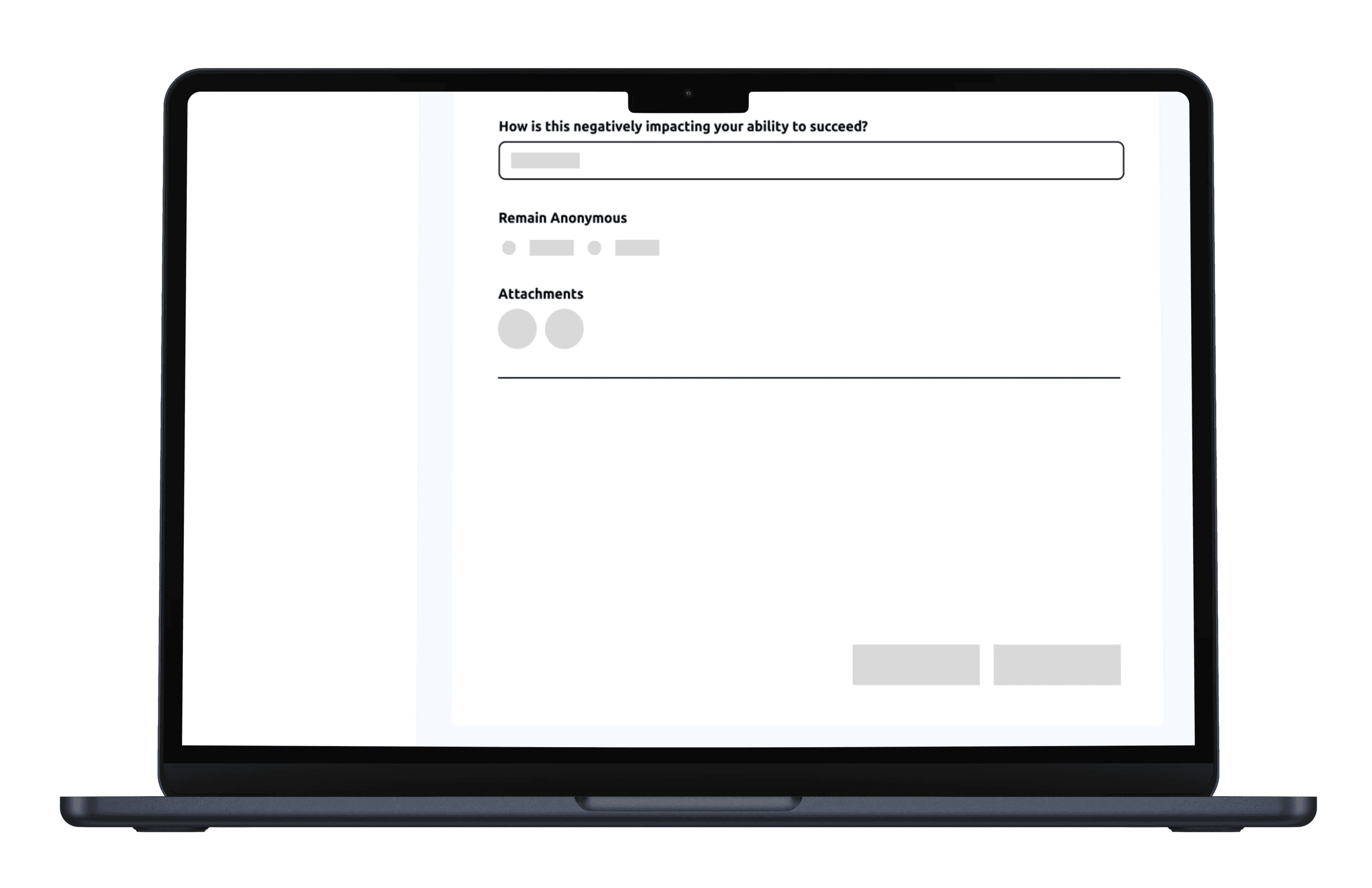
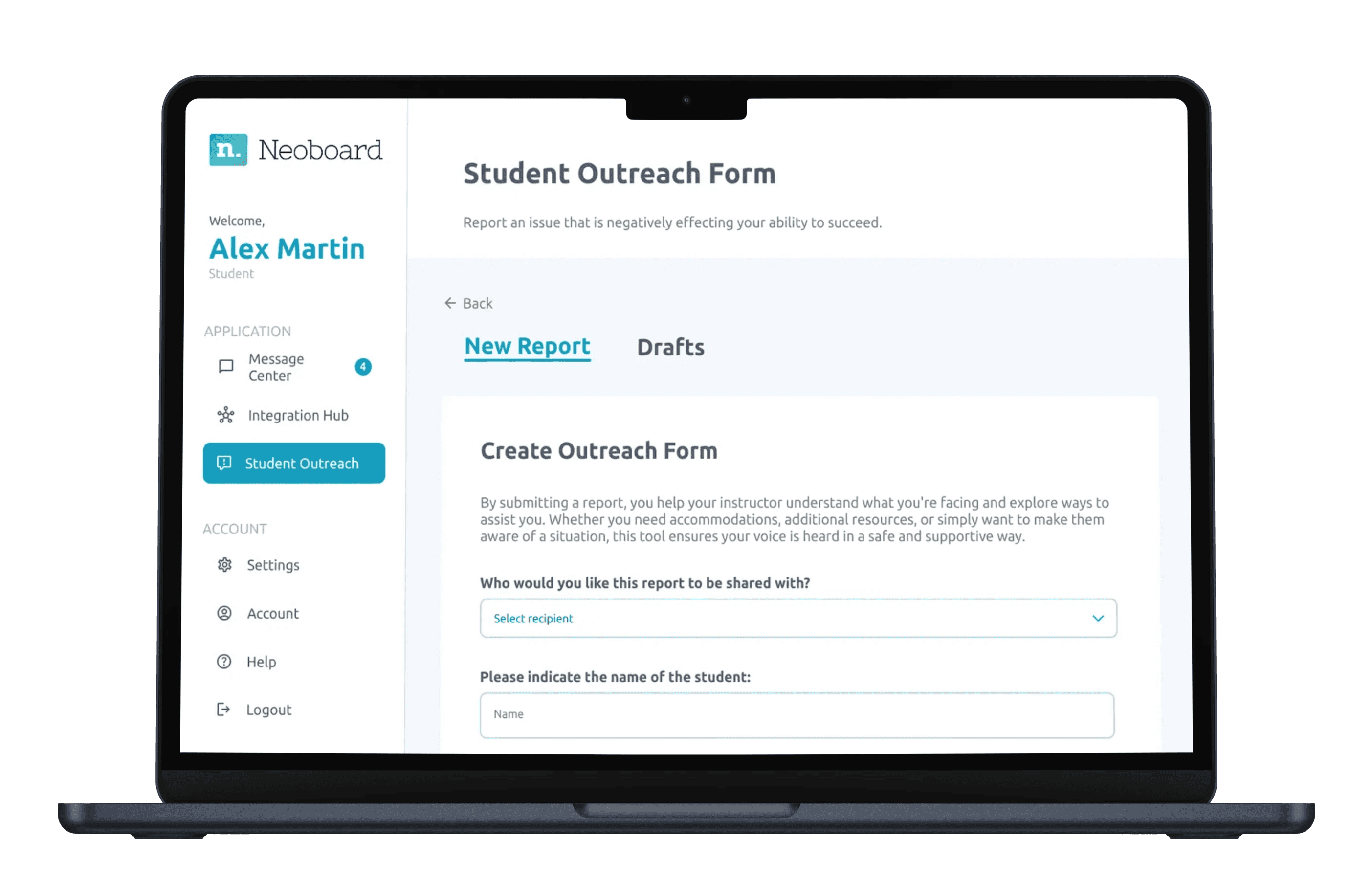
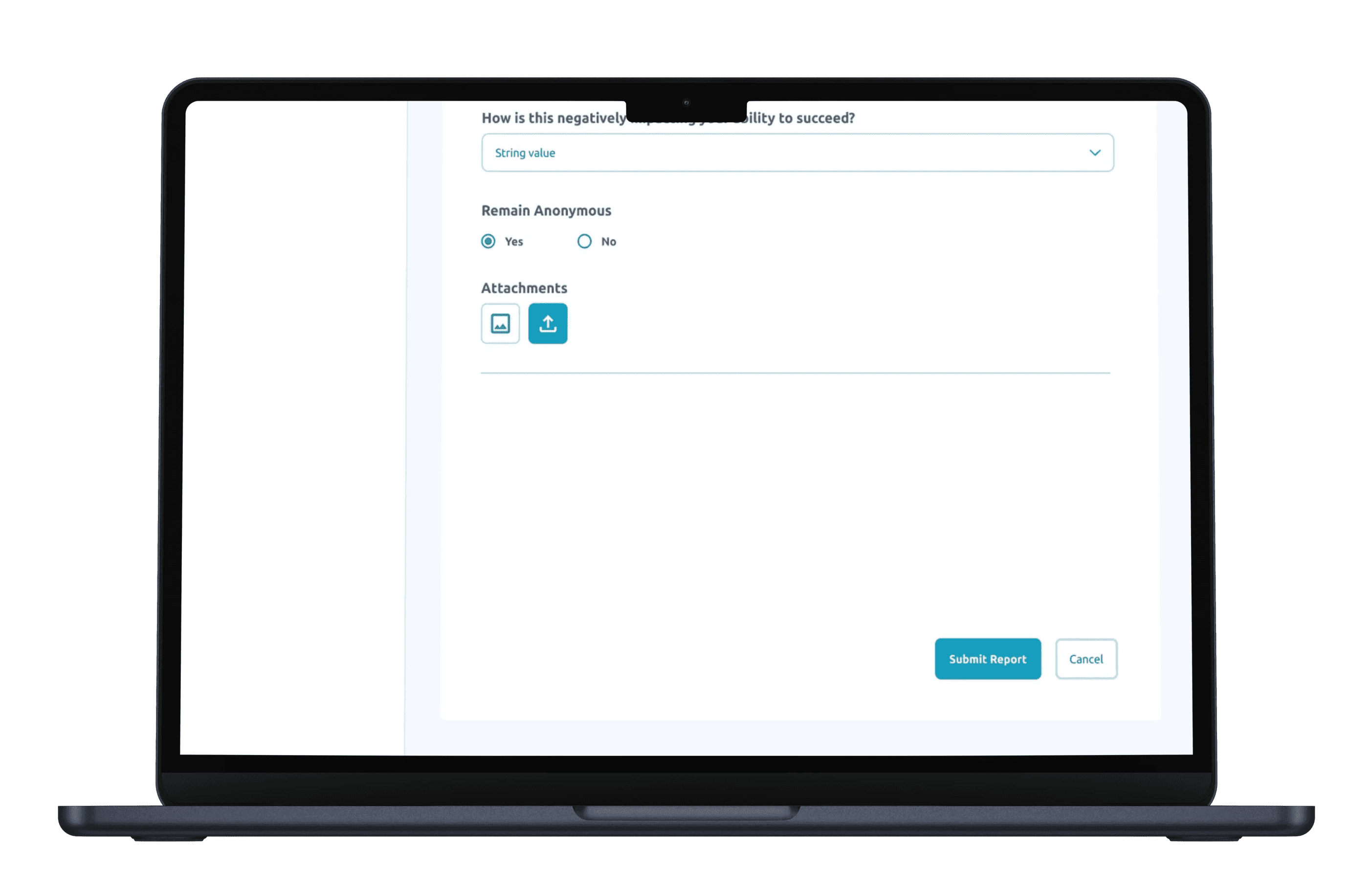
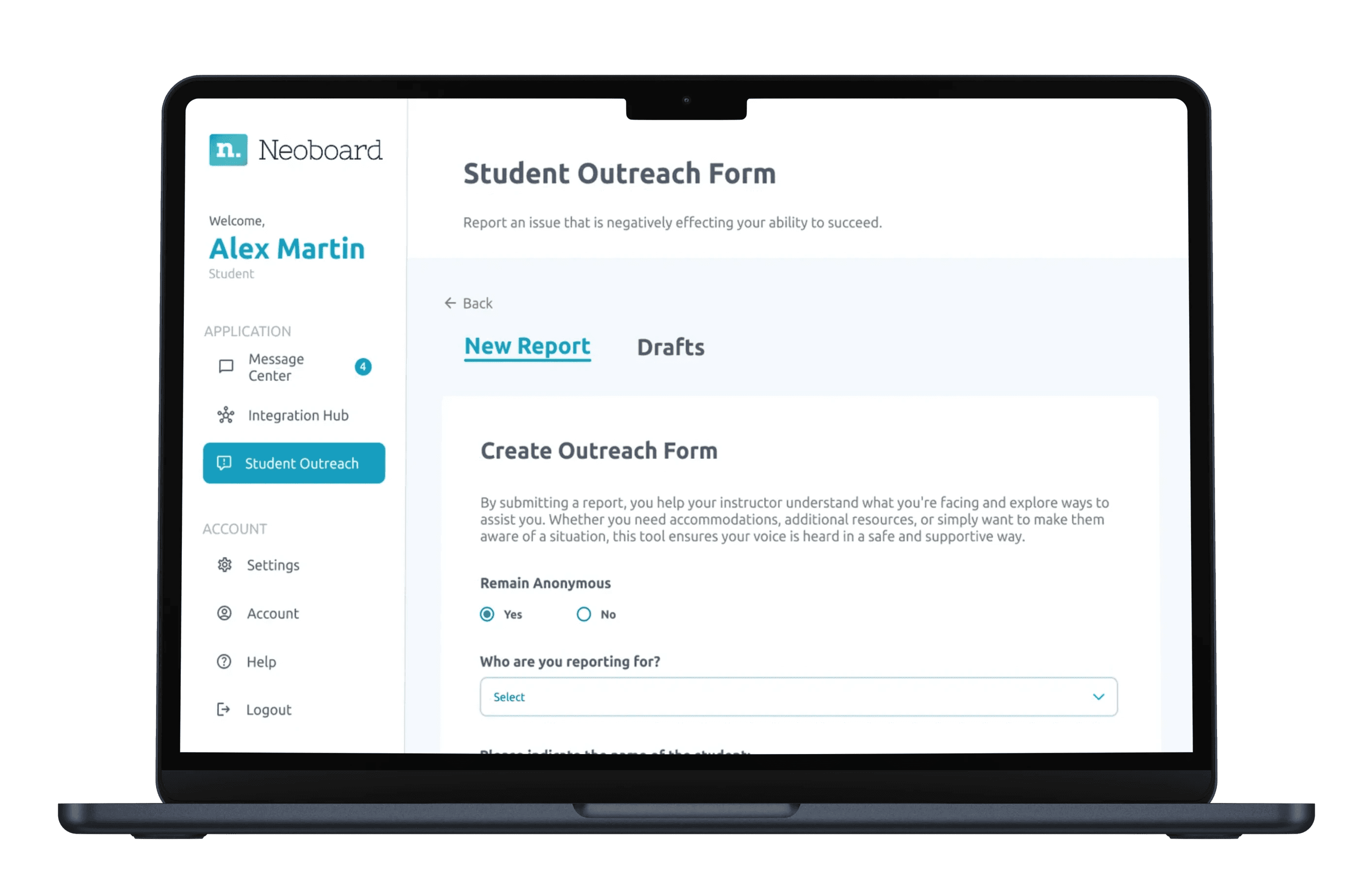
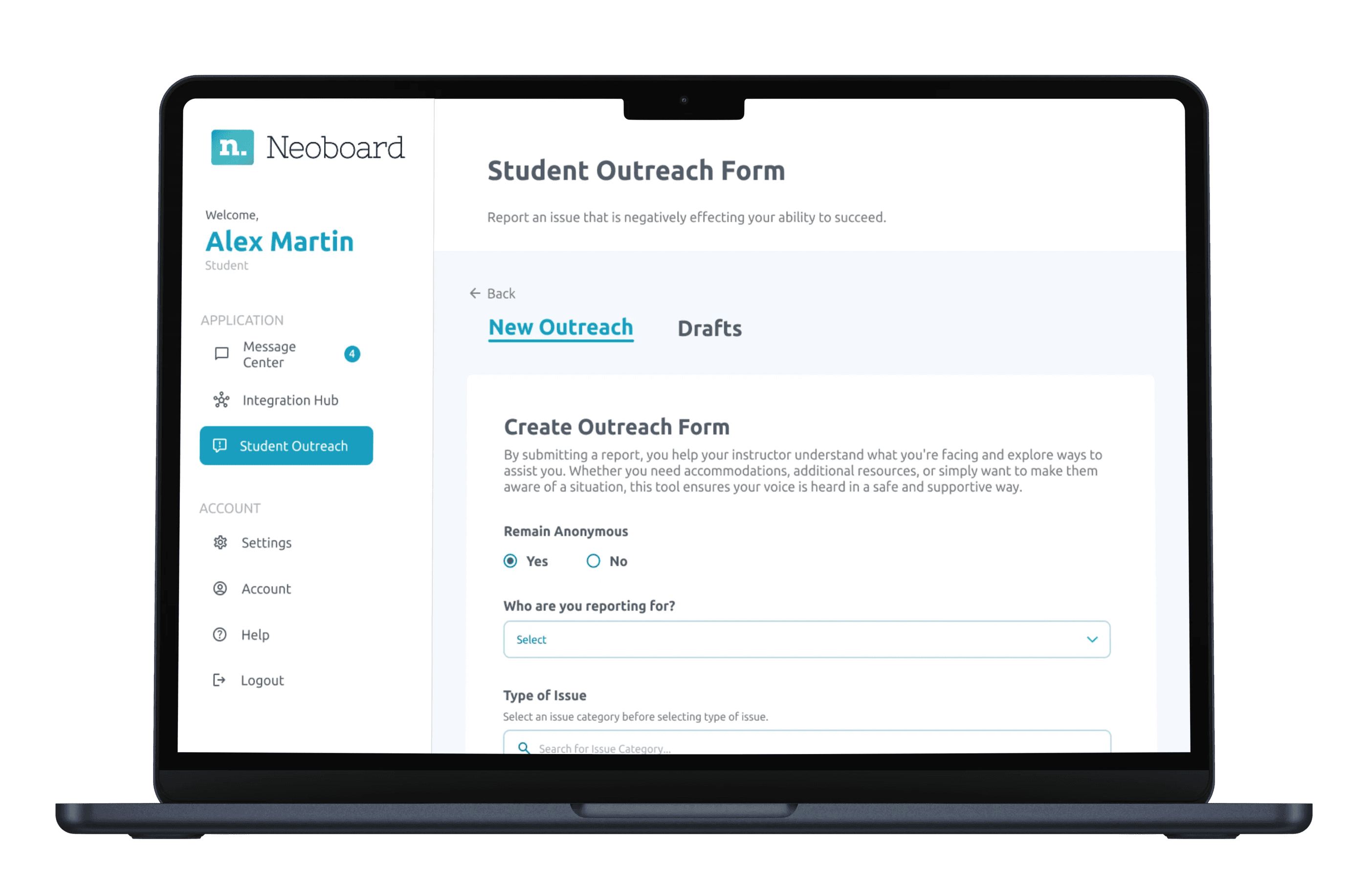
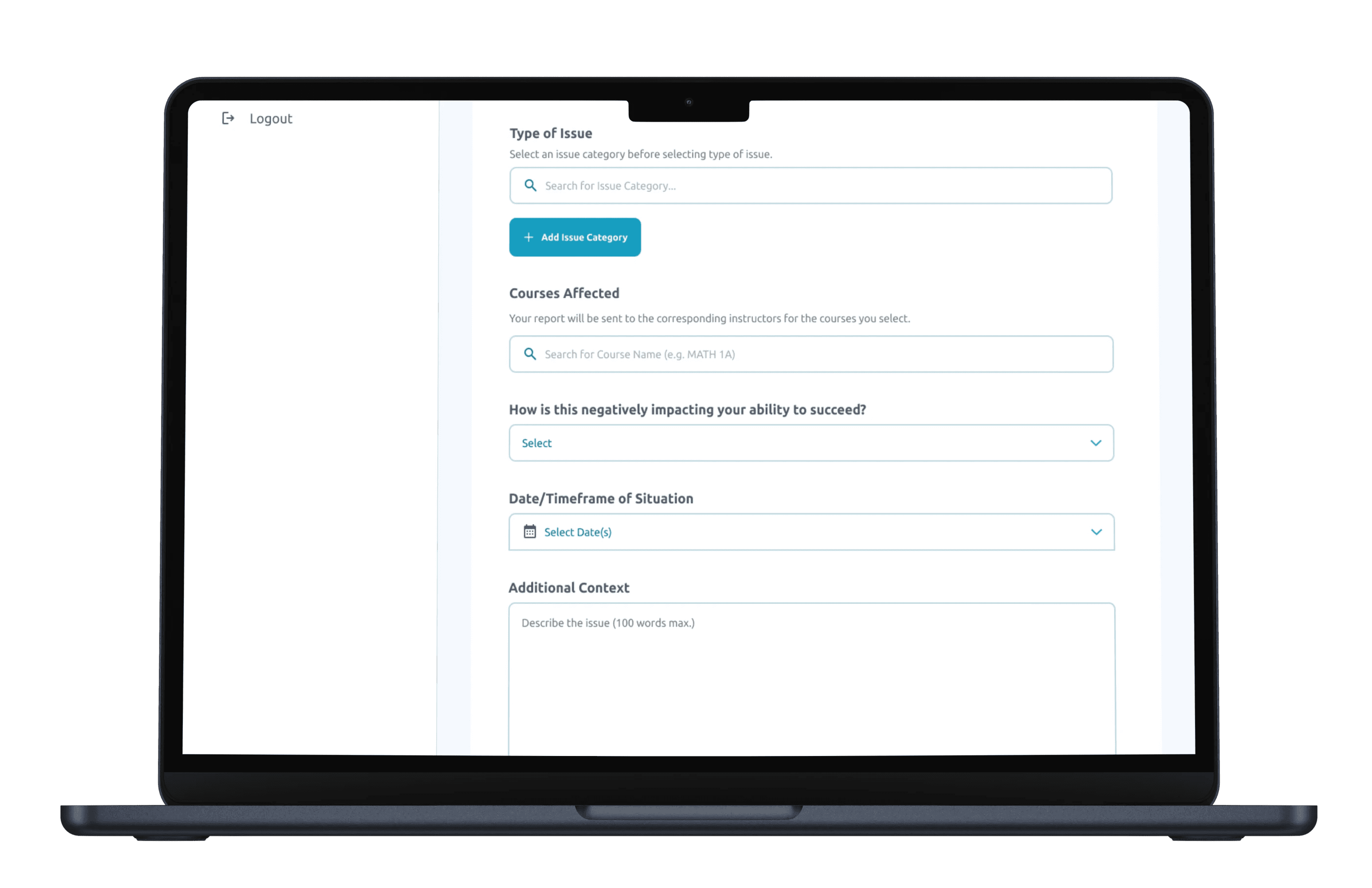
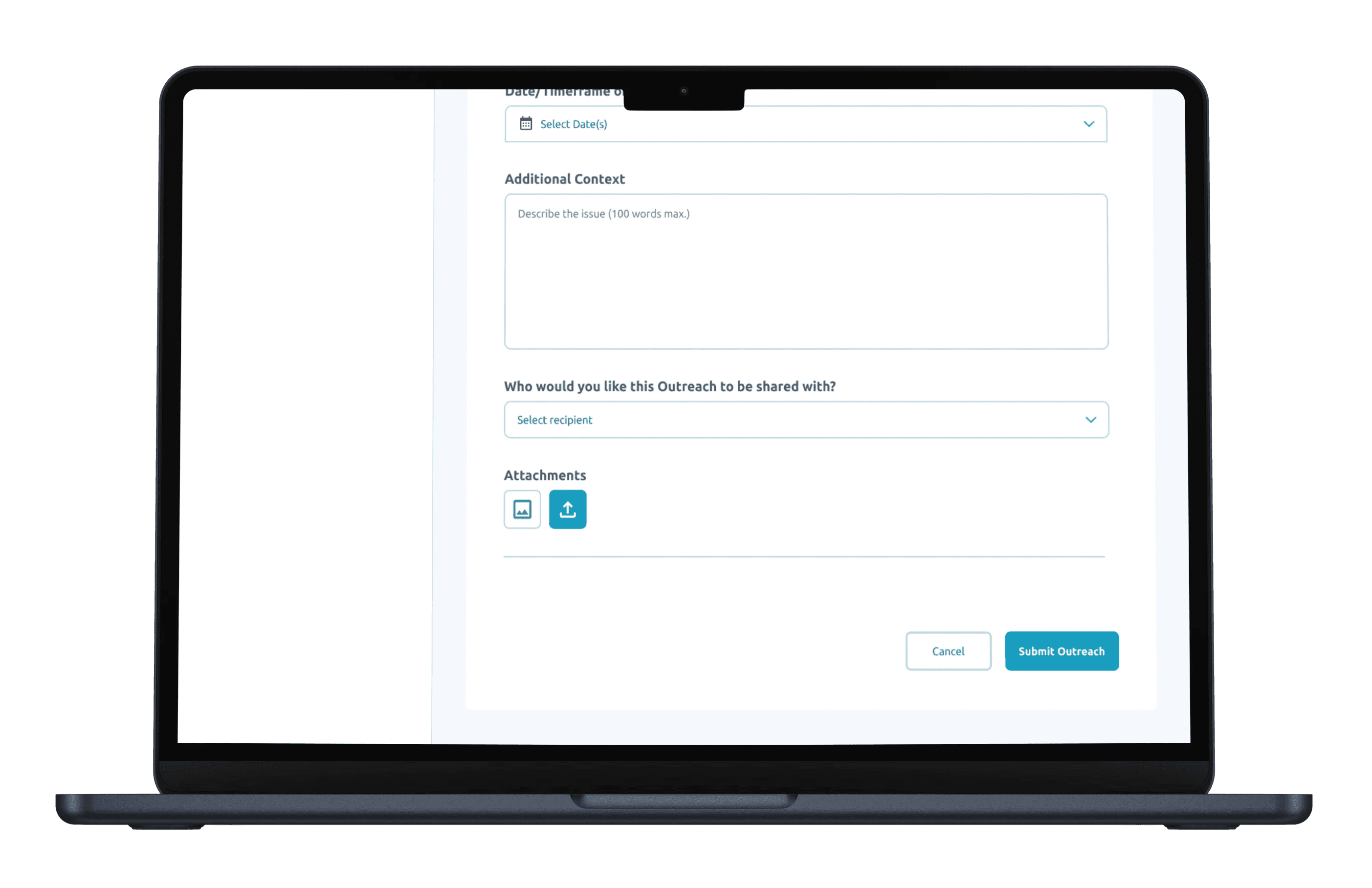
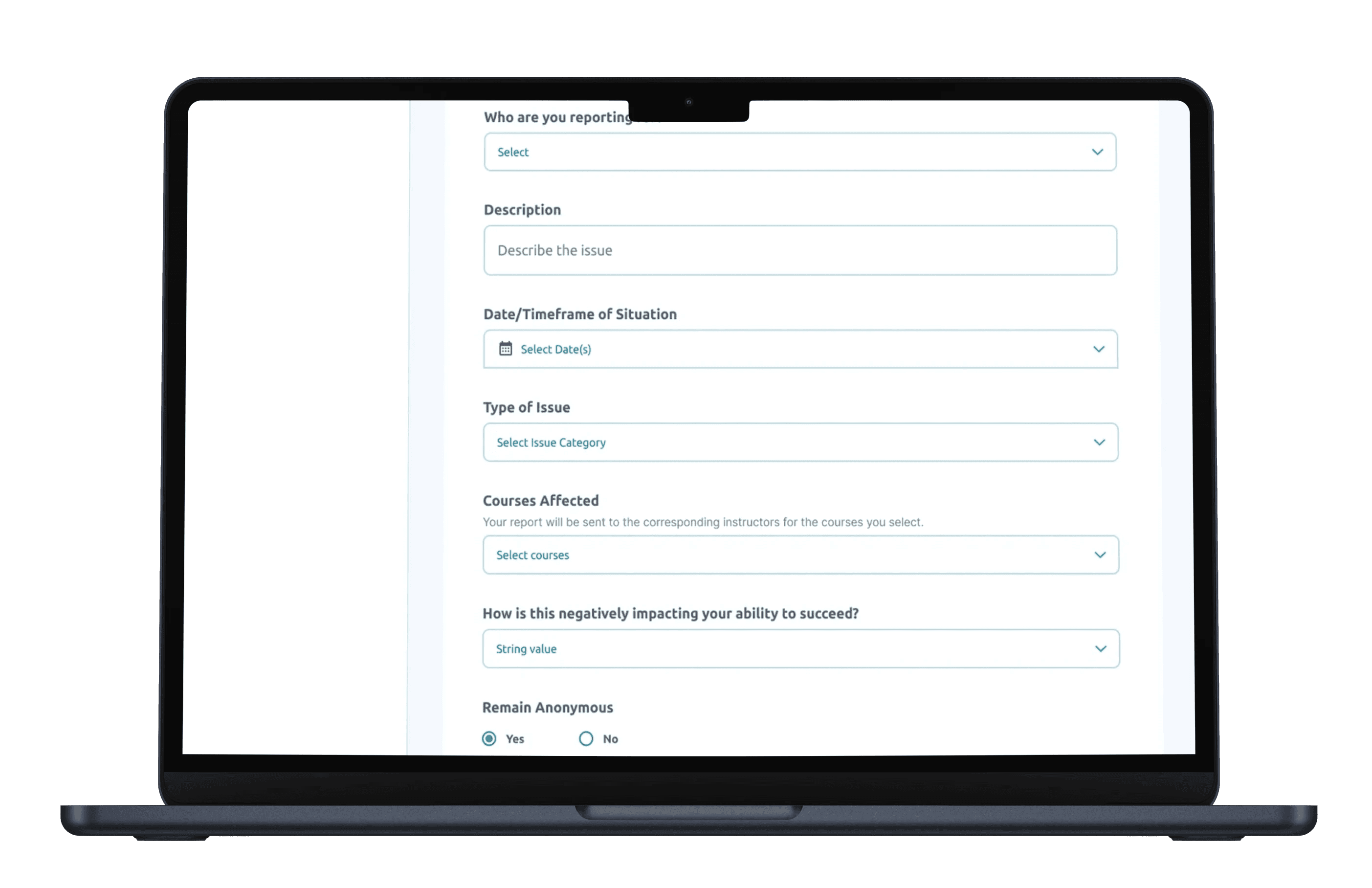
The Outreach Form is designed for students to initiate communication with instructors regarding academic concerns or support needs. This form empowers students to actively seek assistance and document their outreach efforts.


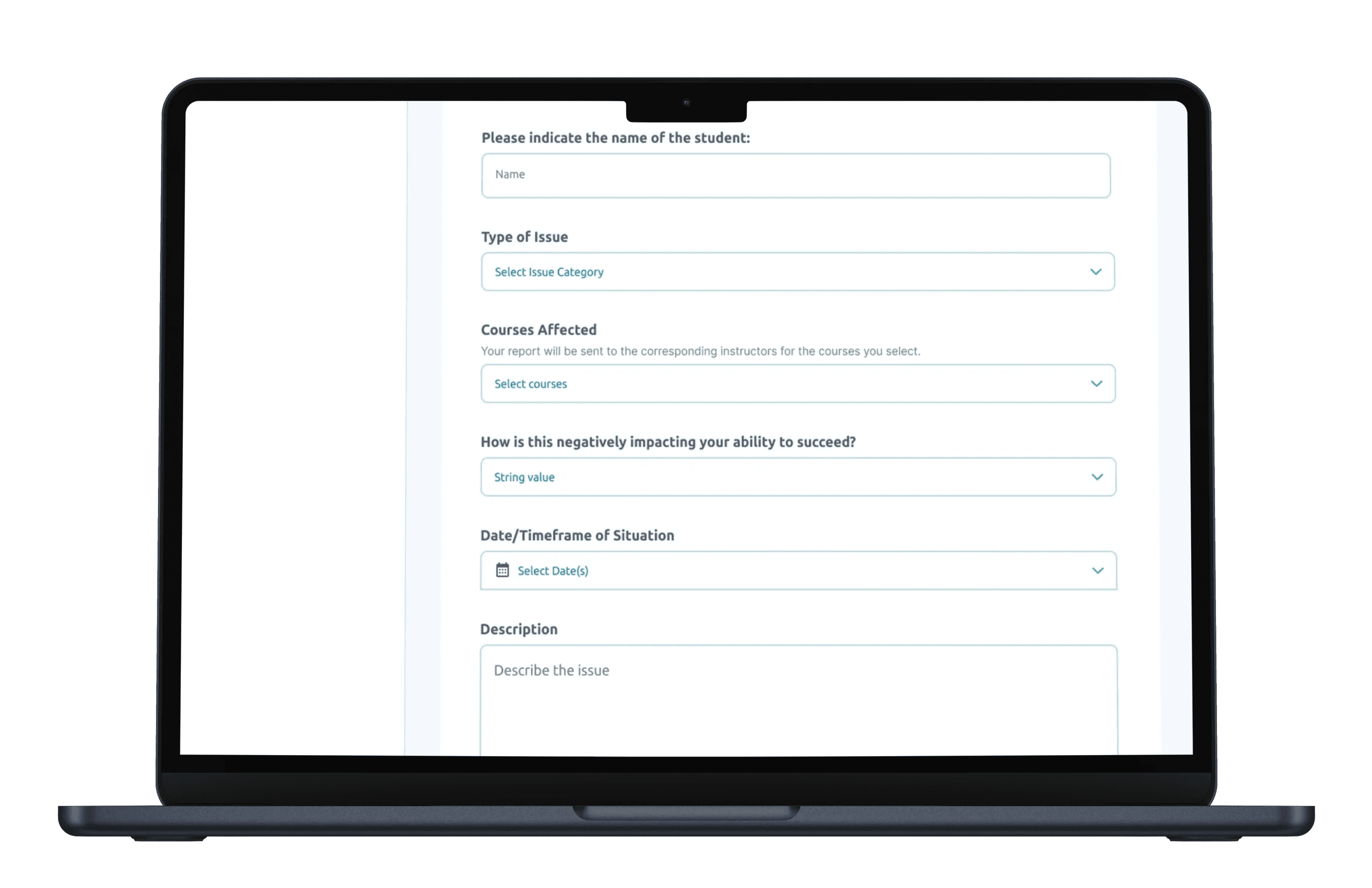
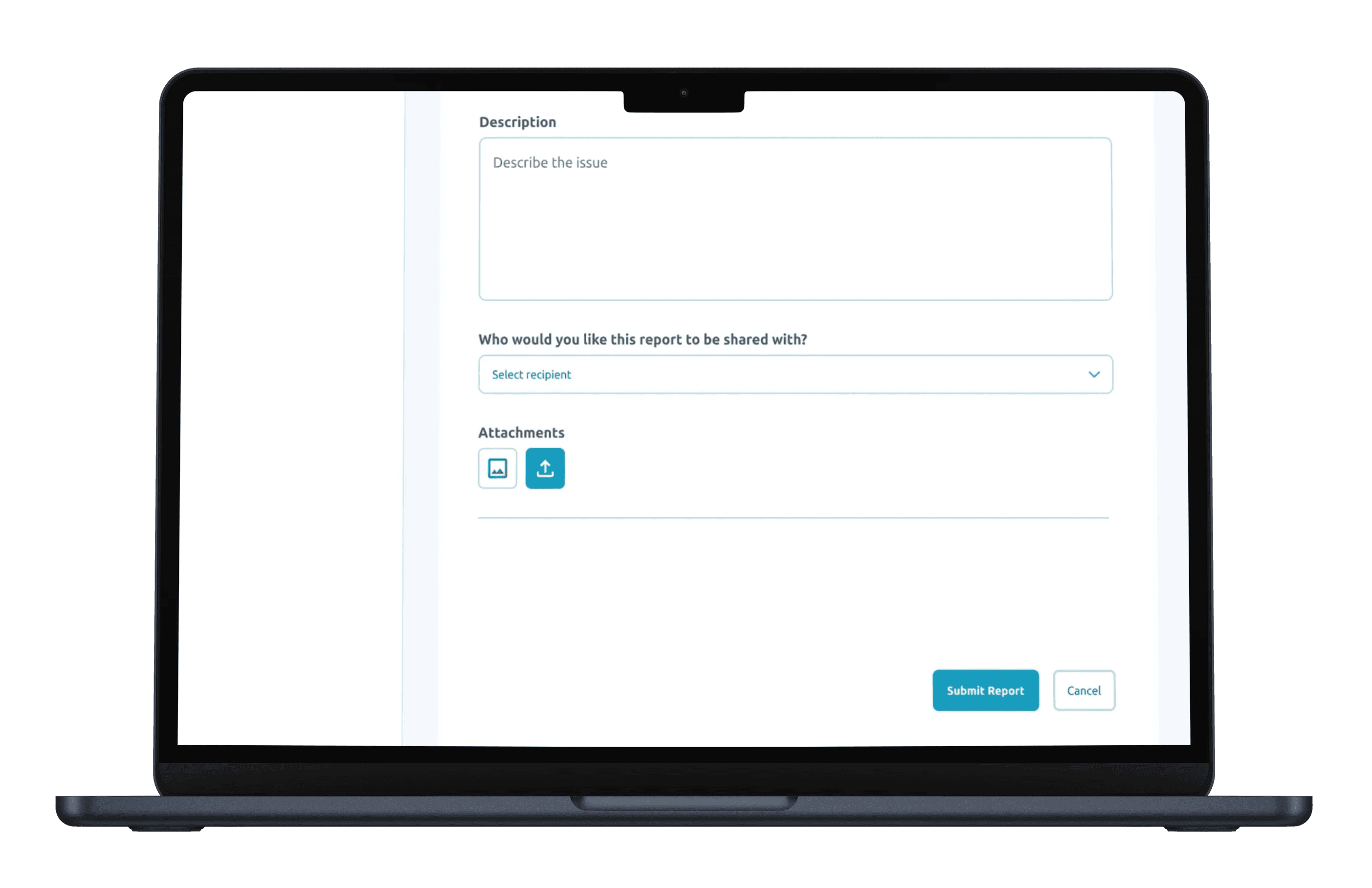
Each field is tailored to capture the essential information for effective outreach:

  • Who you are reporting for: Identifies the student requesting outreach.

  • Date of Situation: Records when the issue was made.

  • Type of Issue: Allows students to specify the in-depth issue (e.g., academics, mental health).

  • Courses Affected: Lets students provide the course/subject name.

  • Description: A section for students to articulate their concerns or questions clearly, ensuring that instructors have the necessary context for their response.

  • Report to be shared with: Indicates a list of faculty members that the student is will to share there issue with.

  • Drafts: Students can save their outreach requests as drafts, enabling them to refine their messages before submitting them.


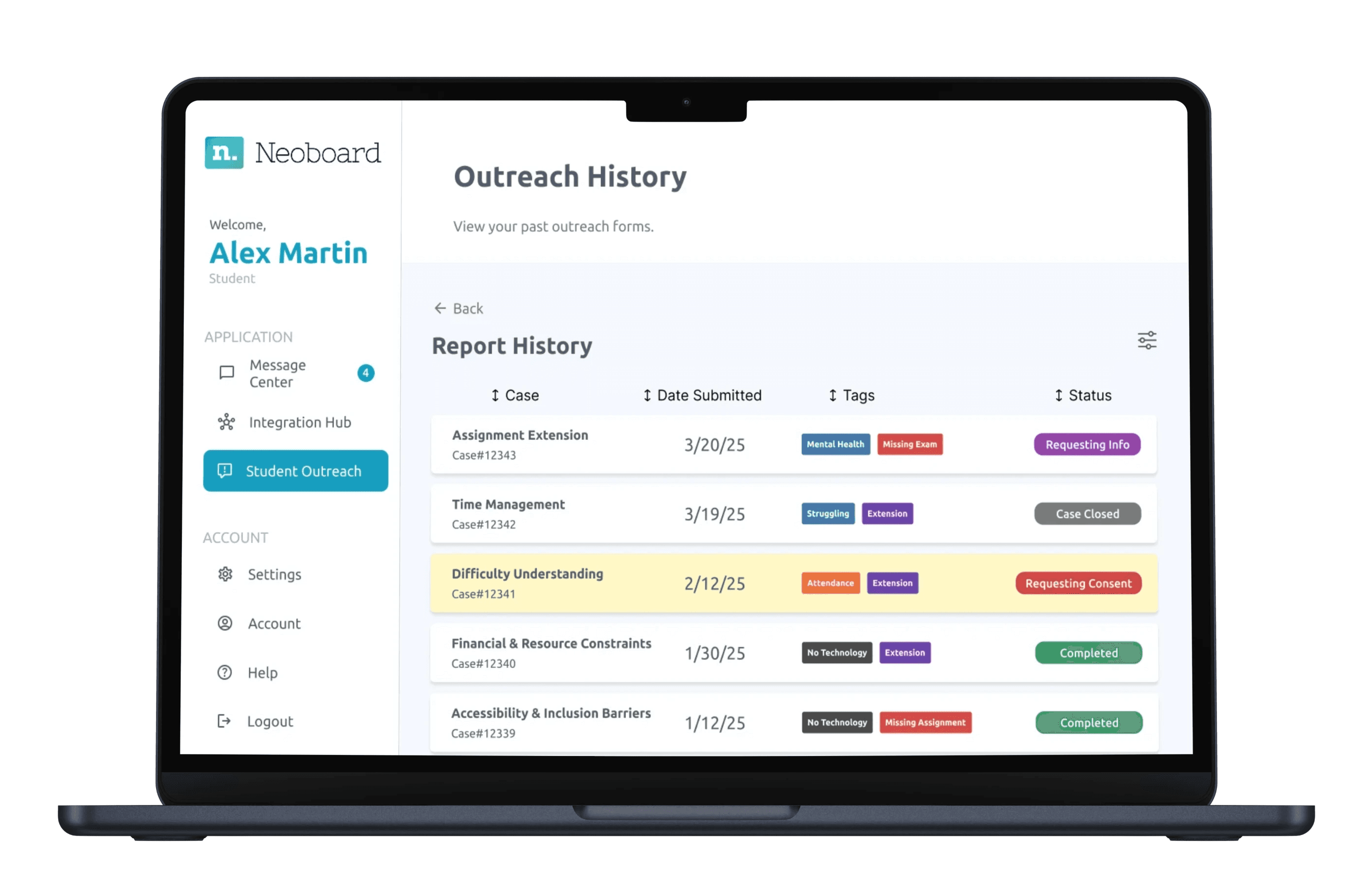
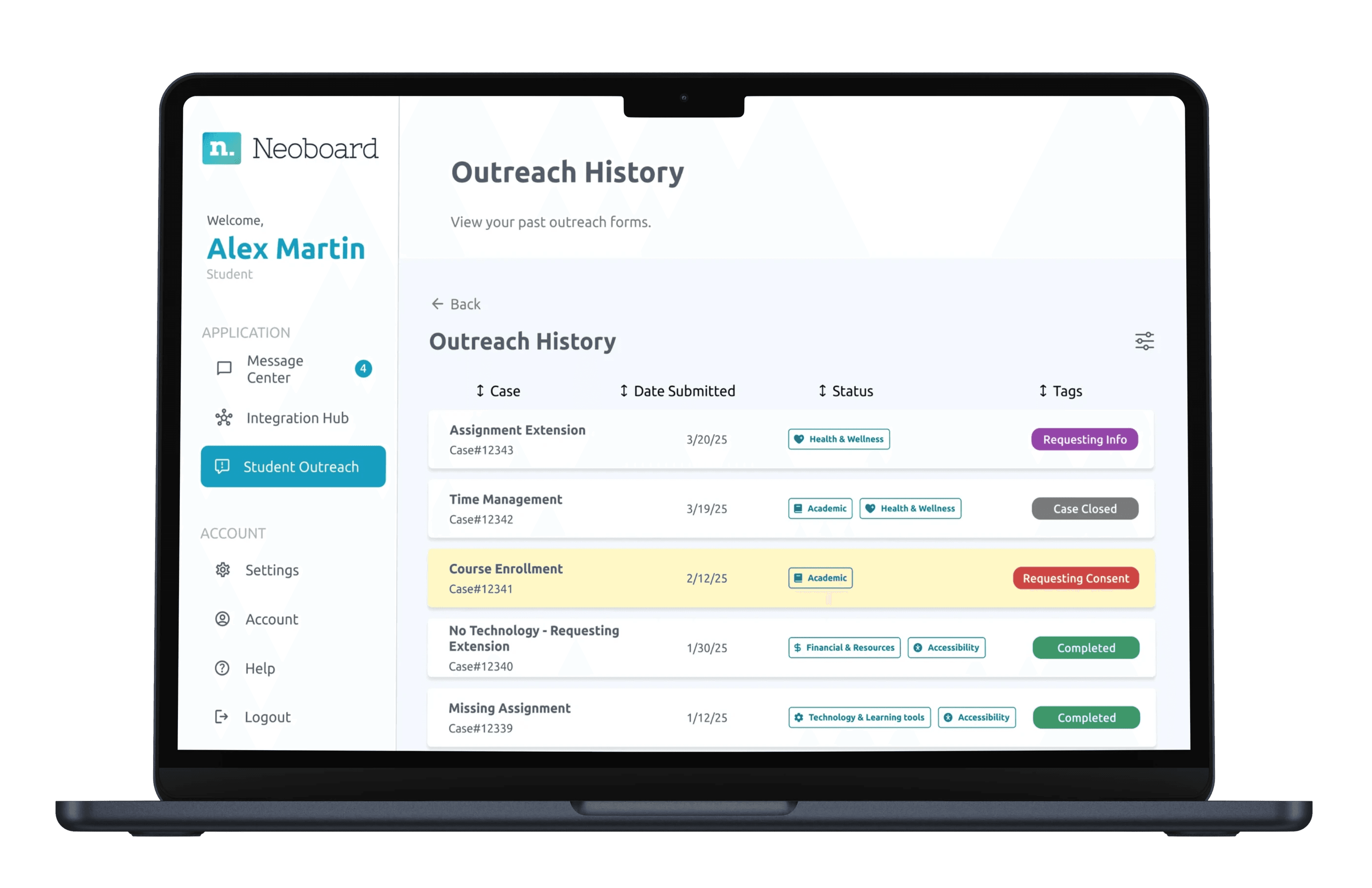
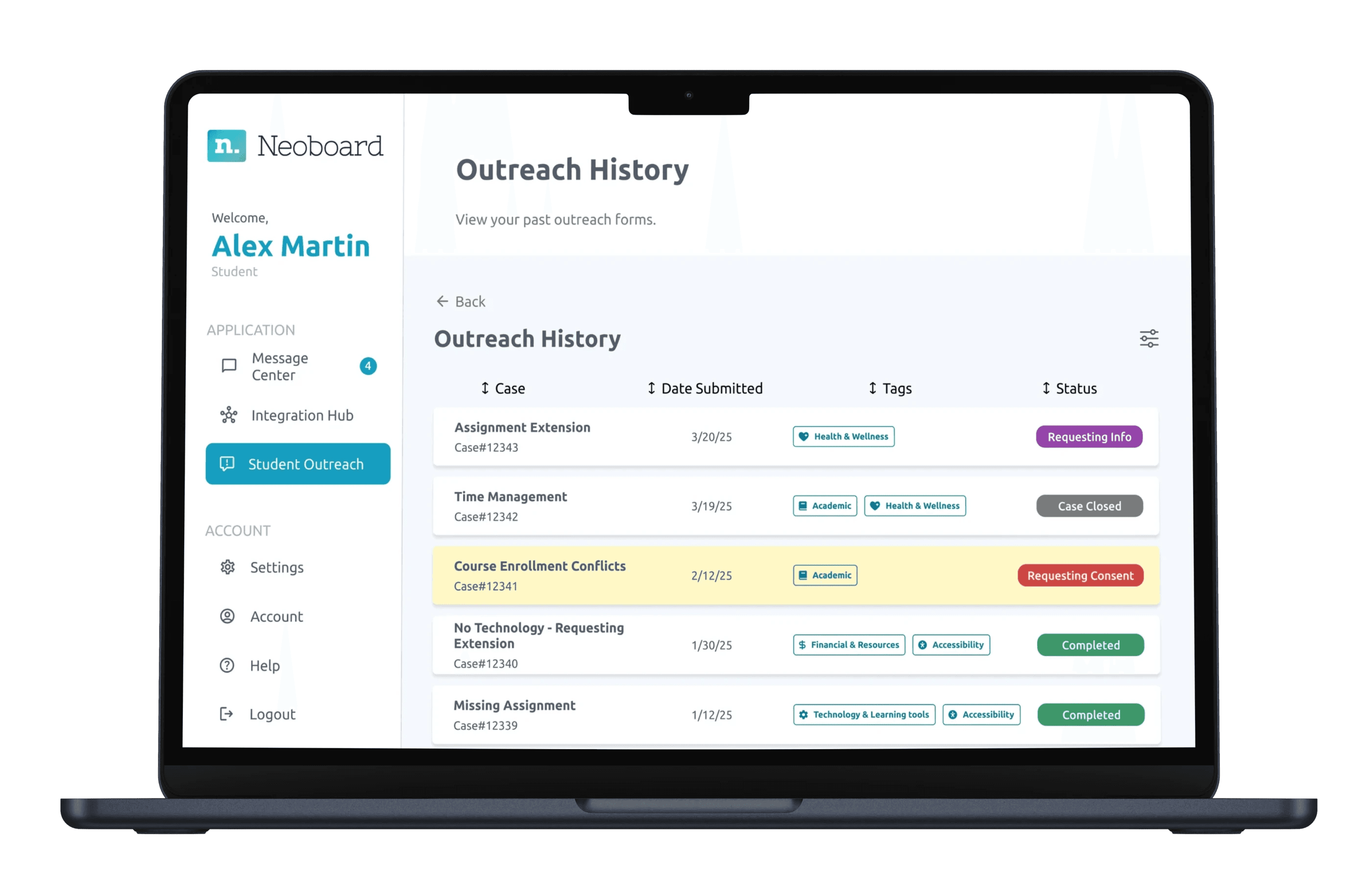
The Outreach History offers students a comprehensive overview of their previous outreach efforts. This feature is crucial for tracking communication with instructors and ensuring that students follow up on any necessary responses.


Displays past outreach requests in a clear, chronological order, making it easy for students to review their interactions with instructors.

  • Status Indicators: Visual cues (e.g., color coding) help students quickly recognize the status of each outreach request—responded, pending, or requiring follow-up.

  • Current Courses: The history includes context about the courses the student is enrolled in, ensuring that outreach requests are relevant and tailored to current academic responsibilities.


The Outreach Form is designed for students to initiate communication with instructors regarding academic concerns or support needs. This form empowers students to actively seek assistance and document their outreach efforts.


Each field is tailored to capture the essential information for effective outreach:

  • Who you are reporting for: Identifies the student requesting outreach.

  • Date of Situation: Records when the issue was made.

  • Type of Issue: Allows students to specify the in-depth issue (e.g., academics, mental health).

  • Courses Affected: Lets students provide the course/subject name.

  • Description: A section for students to articulate their concerns or questions clearly, ensuring that instructors have the necessary context for their response.

  • Report to be shared with: Indicates a list of faculty members that the student is will to share there issue with.

  • Drafts: Students can save their outreach requests as drafts, enabling them to refine their messages before submitting them.

The Outreach History offers students a comprehensive overview of their previous outreach efforts. This feature is crucial for tracking communication with instructors and ensuring that students follow up on any necessary responses.


Displays past outreach requests in a clear, chronological order, making it easy for students to review their interactions with instructors.

  • Status Indicators: Visual cues (e.g., color coding) help students quickly recognize the status of each outreach request—responded, pending, or requiring follow-up.

  • Current Courses: The history includes context about the courses the student is enrolled in, ensuring that outreach requests are relevant and tailored to current academic responsibilities.


The Outreach Form is designed for students to initiate communication with instructors regarding academic concerns or support needs. This form empowers students to actively seek assistance and document their outreach efforts.


Each field is tailored to capture the essential information for effective outreach:

  • Who you are reporting for: Identifies the student requesting outreach.

  • Date of Situation: Records when the issue was made.

  • Type of Issue: Allows students to specify the in-depth issue (e.g., academics, mental health).

  • Courses Affected: Lets students provide the course/subject name.

  • Description: A section for students to articulate their concerns or questions clearly, ensuring that instructors have the necessary context for their response.

  • Report to be shared with: Indicates a list of faculty members that the student is will to share there issue with.

  • Drafts: Students can save their outreach requests as drafts, enabling them to refine their messages before submitting them.


The Outreach History offers students a comprehensive overview of their previous outreach efforts. This feature is crucial for tracking communication with instructors and ensuring that students follow up on any necessary responses.


Displays past outreach requests in a clear, chronological order, making it easy for students to review their interactions with instructors.

  • Status Indicators: Visual cues (e.g., color coding) help students quickly recognize the status of each outreach request—responded, pending, or requiring follow-up.

  • Current Courses: The history includes context about the courses the student is enrolled in, ensuring that outreach requests are relevant and tailored to current academic responsibilities.


Ideations - Usability Testing

I conducted several usability testing to determine the optimal layout and possible design changes.


I conducted several usability testing to determine the optimal layout and possible design changes.


Idea 1

Idea 1


Idea 2

Idea 2


Final Design

Final Design

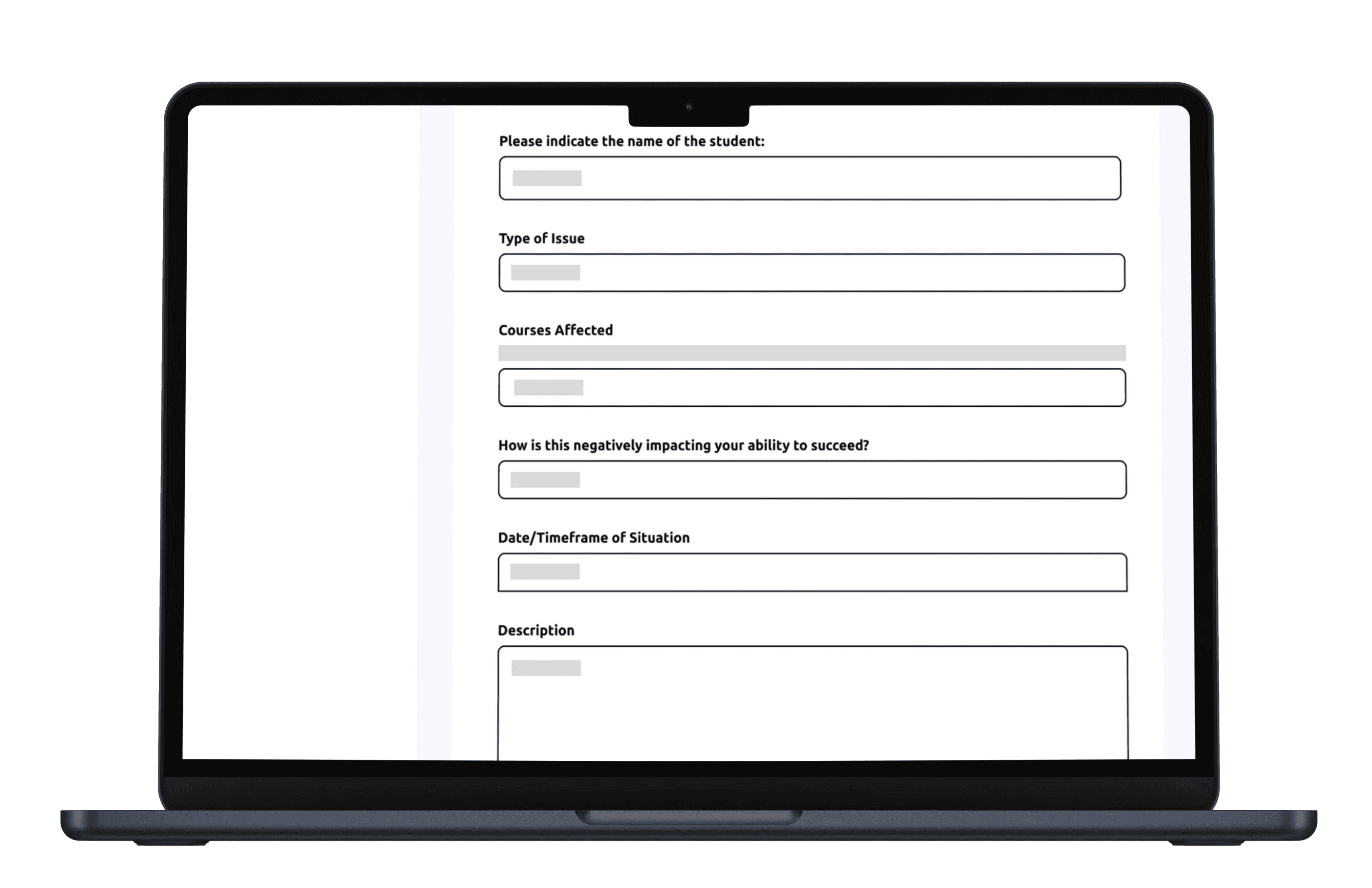
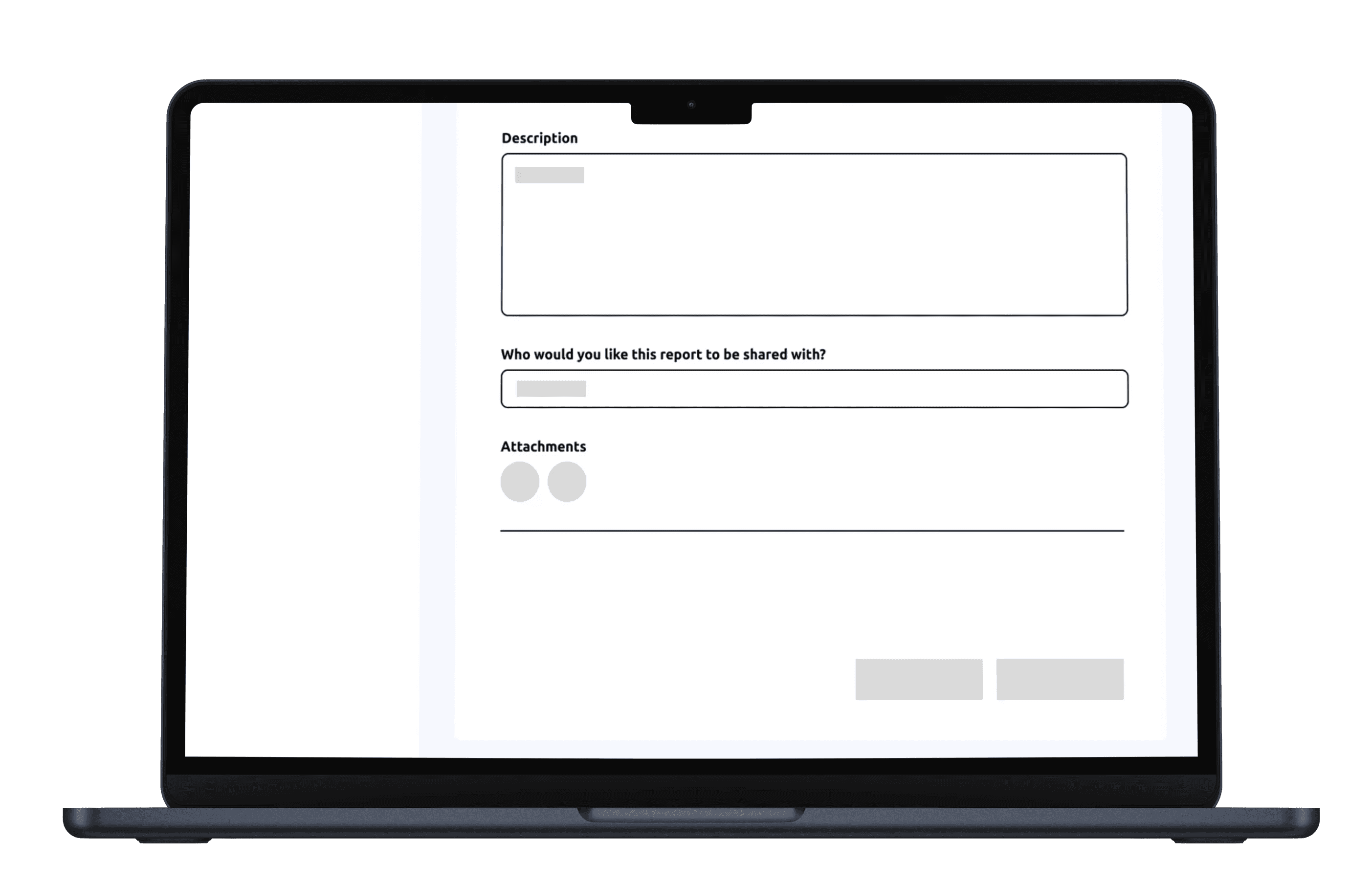
Based on the amount of usability testing that I conducted, there were many changes that I implemented that meets the users' needs. Users mentioned that "Indicating the name" is not important, so I decided to remove that category. Users only need to specify who they are reporting for (themselves or another student), since instructors know the students' name. In the "Type of Issue" category, I added a functionality that can let users add more than one issue or input their own issue if it is not listed. The "Description" section is changed to "Additional Context" to clarify the users to input their own thoughts, which helps instructors understand the issue better. Every word that was labeled as Report" has been modified the be written as "Outreach," since users were confused with the wording of this form. The layout is more intuitive, guiding users through each step.


Based on the amount of usability testing that I conducted, there were many changes that I implemented that meets the users' needs. Users mentioned that "Indicating the name" is not important, so I decided to remove that category. Users only need to specify who they are reporting for (themselves or another student), since instructors know the students' name. In the "Type of Issue" category, I added a functionality that can let users add more than one issue or input their own issue if it is not listed. The "Description" section is changed to "Additional Context" to clarify the users to input their own thoughts, which helps instructors understand the issue better. Every word that was labeled as Report" has been modified the be written as "Outreach," since users were confused with the wording of this form. The layout is more intuitive, guiding users through each step.


Idea 1

Idea 1


Idea 2

Idea 2


Final Design

Final Design

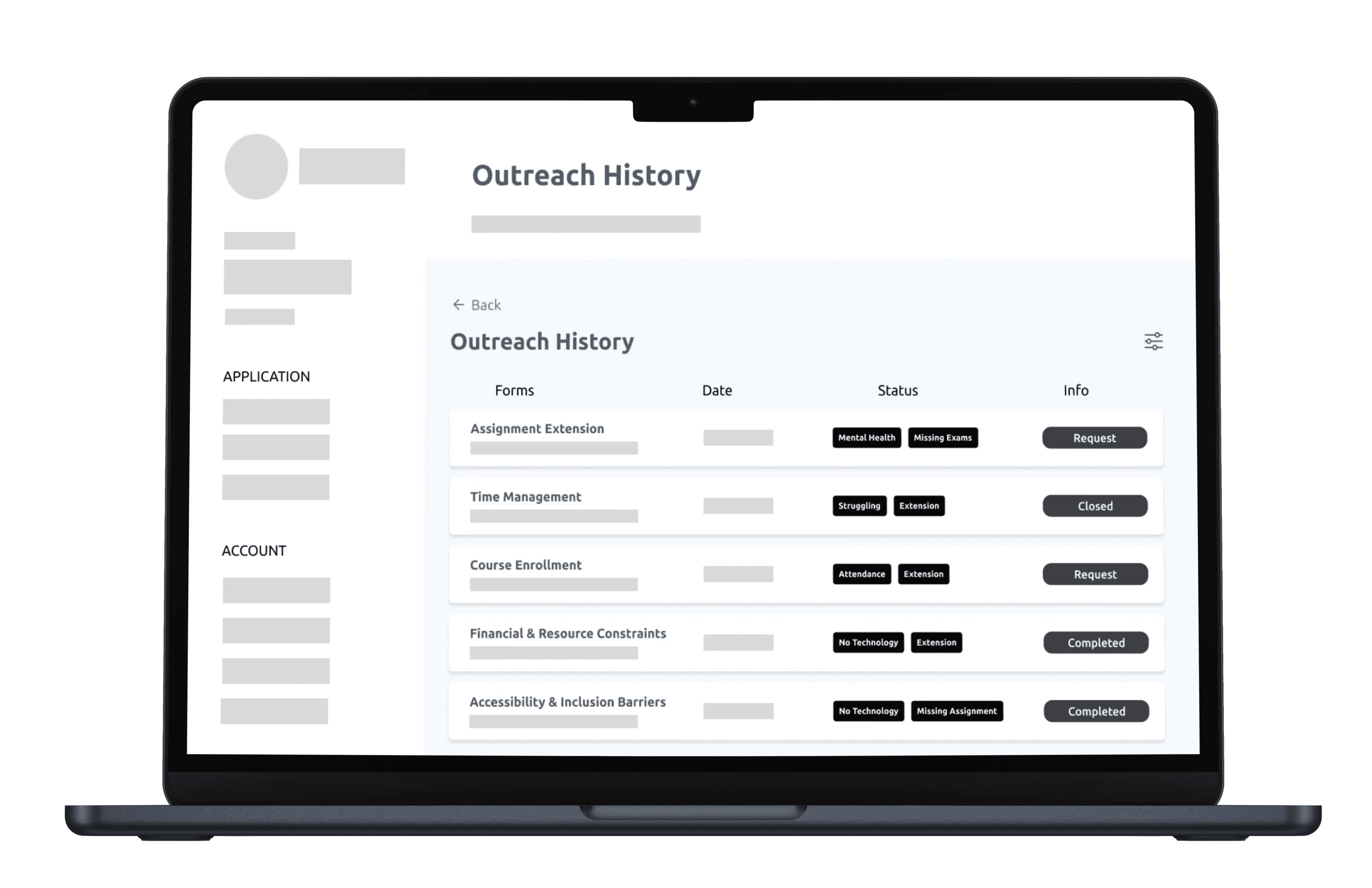
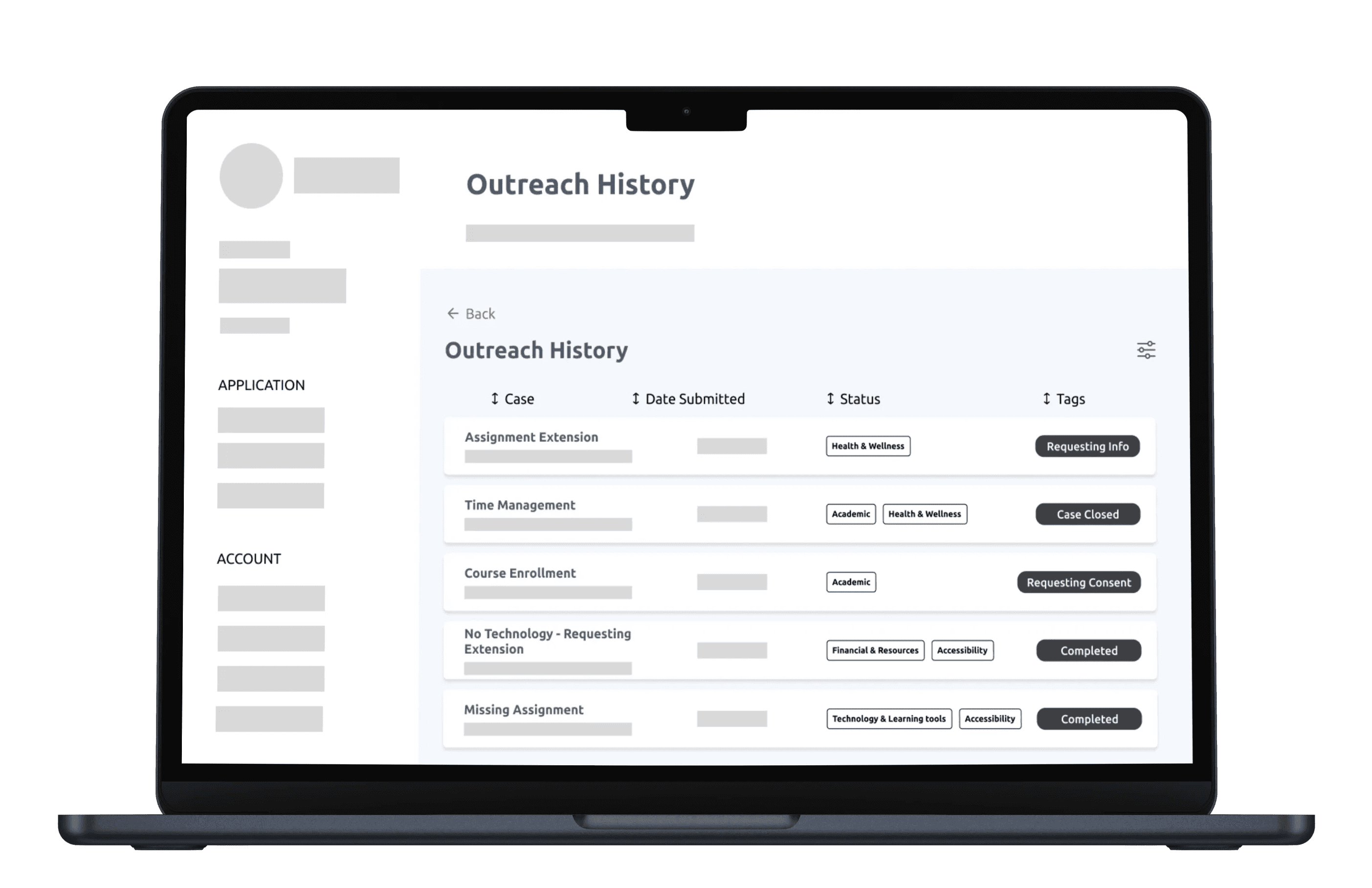
During the usability testing phase for the Outreach History feature, several key insights emerged that informed the final design. Users expressed a need for a clear and organized view of their outreach efforts. These past outreach requests is set in a chronological order. This layout allows students to easily navigate through their interactions, enhancing overall usability. Users highlighted the importance of quickly identifying the status and tags of each outreach request. To address this, the design incorporates visual cues, such as color coding. These status indicators clearly denote whether a request is "Requesting Info," "Case Closed," or "Requesting Consent," making it easier for students to manage their communications. The Tags were changed to have one color, so that there isn't any confusion with the different colors in Idea 1. Idea 2 is more of the final design that meets the users' needs, while conducting several usability testing, but made small adjustments. Students wanted context regarding their current courses to ensure that outreach requests were relevant with the case names given. This includes information about the courses each student is enrolled in, which helps tailor the outreach history to their academic responsibilities, allowing for more focused follow-ups. Users appreciated the ability to see additional details about each case, such as the case number and submission date. This information has been retained in the final design, providing students with a comprehensive overview of their outreach history.


During the usability testing phase for the Outreach History feature, several key insights emerged that informed the final design. Users expressed a need for a clear and organized view of their outreach efforts. These past outreach requests is set in a chronological order. This layout allows students to easily navigate through their interactions, enhancing overall usability. Users highlighted the importance of quickly identifying the status and tags of each outreach request. To address this, the design incorporates visual cues, such as color coding. These status indicators clearly denote whether a request is "Requesting Info," "Case Closed," or "Requesting Consent," making it easier for students to manage their communications. The Tags were changed to have one color, so that there isn't any confusion with the different colors in Idea 1. Idea 2 is more of the final design that meets the users' needs, while conducting several usability testing, but made small adjustments. Students wanted context regarding their current courses to ensure that outreach requests were relevant with the case names given. This includes information about the courses each student is enrolled in, which helps tailor the outreach history to their academic responsibilities, allowing for more focused follow-ups. Users appreciated the ability to see additional details about each case, such as the case number and submission date. This information has been retained in the final design, providing students with a comprehensive overview of their outreach history.

Design Solution - Problem 1

"Type of Issue" became a core feature of Neoboard’s design after user research revealed that students struggled to communicate and specify the issue they are having. With the changes that I modified, users can select specific types of issues (e.g., academic, health & wellness, accesibility, or financial), this feature helps to categorize concerns. The name for each case conflicts with how their issue impacts them to succeed. This categorization streamlines communication and ensures that instructors can quickly identify and address the nature of the problem when reviewing the students' forms in the Outreach history. Competitors like Gmail and Discord lacked this depth, presenting an opportunity for Neoboard to differentiate itself. By prioritizing data-driven decision-making, we created a more tailored experience and strengthened Neoboard’s market position as an essential tool for students, driving adoption and long-term engagement.

"Type of Issue" became a core feature of Neoboard’s design after user research revealed that students struggled to communicate and specify the issue they are having. With the changes that I modified, users can select specific types of issues (e.g., academic, health & wellness, accesibility, or financial), this feature helps to categorize concerns. The name for each case conflicts with how their issue impacts them to succeed. This categorization streamlines communication and ensures that instructors can quickly identify and address the nature of the problem when reviewing the students' forms in the Outreach history. Competitors like Gmail and Discord lacked this depth, presenting an opportunity for Neoboard to differentiate itself. By prioritizing data-driven decision-making, we created a more tailored experience and strengthened Neoboard’s market position as an essential tool for students, driving adoption and long-term engagement.

Design Solution - Problem 2

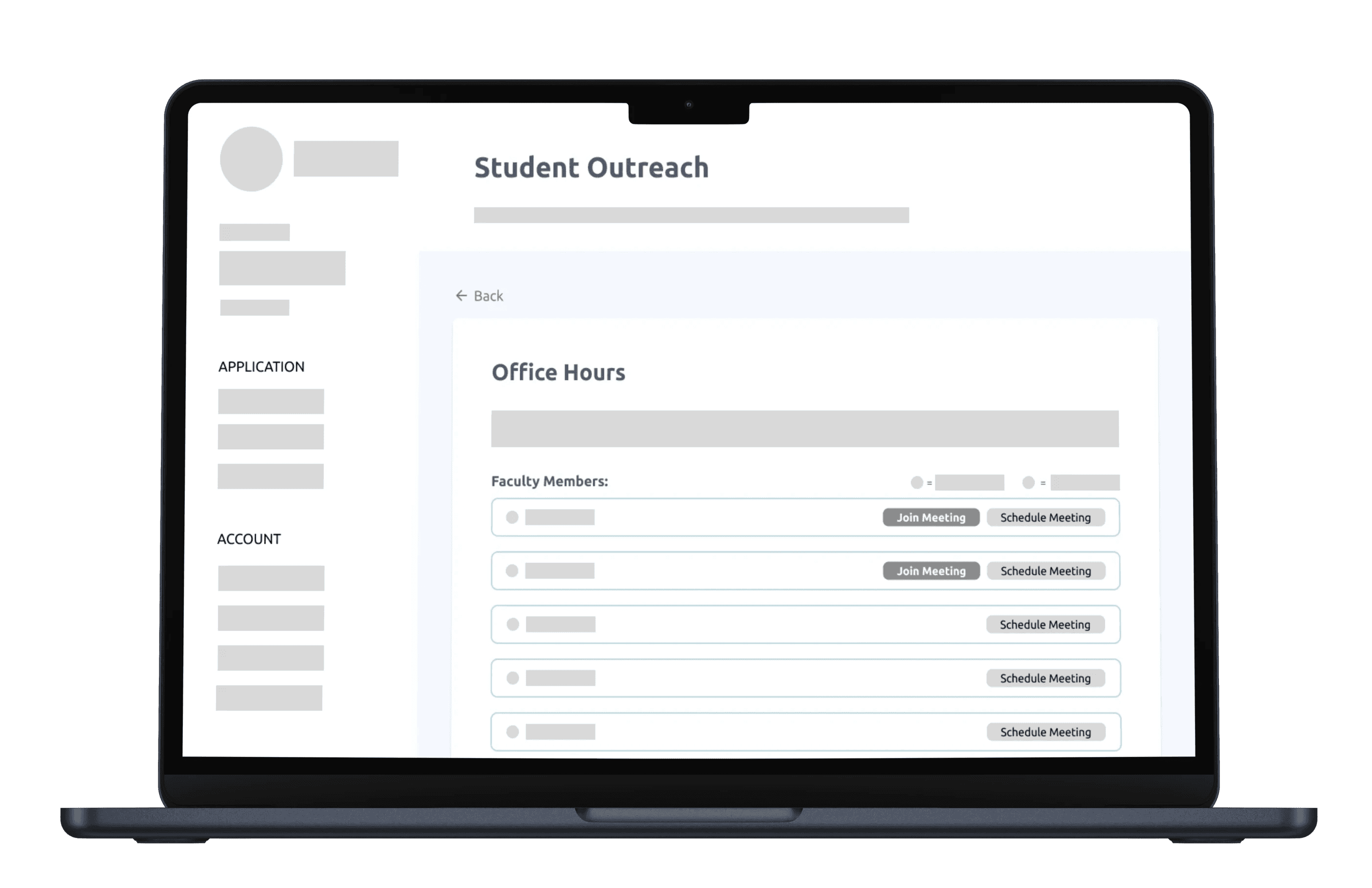
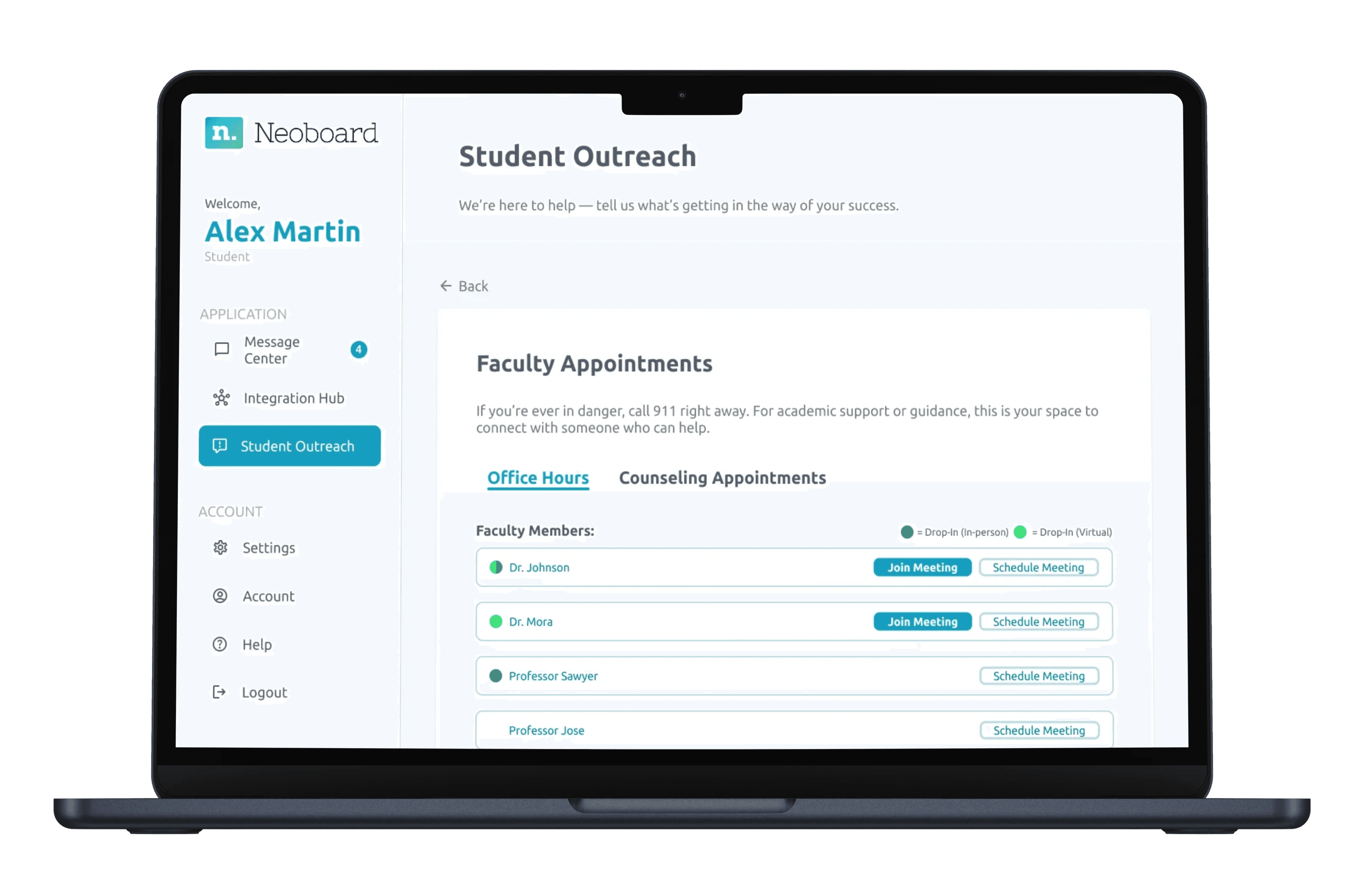
The Join Office Hours was designed to give students a seamless experience in scheduling a virtual or in-person meeting with a faculty member. Not only can students view their availability status, but can also schedule a meeting which gives them the ability to edit, delete, and schedule a time to meet with minimal effort.
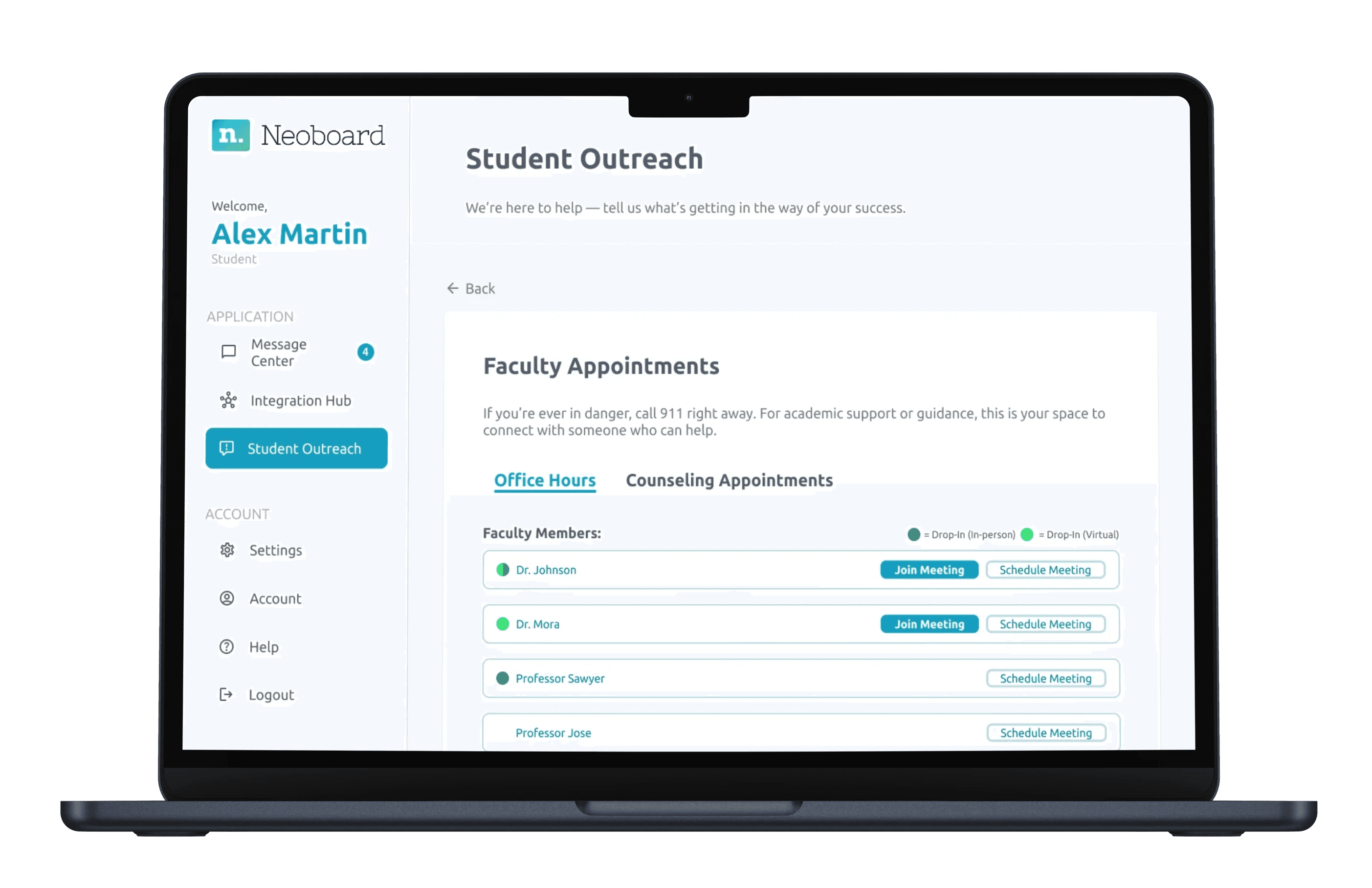


The Join Office Hours was designed to give students a seamless experience in scheduling a virtual or in-person meeting with a faculty member. Not only can students view their availability status, but can also schedule a meeting which gives them the ability to edit, delete, and schedule a time to meet with minimal effort.


Low-Fidelity Wireframes

Low-Fidelity Wireframes

Low-Fidelity Wireframes

  • The design maintains a clean and consistent layout across different faculty members.

  • Included a legend feature that indicates when the faculty member are available, whether it is in-person or virtual.

  • The inclusion of "Join Meeting" and "Schedule Meeting" buttons for each faculty member streamlines the process for students.

  • The "Schedule Meeting" feature allows users to schedule a one-on-one meeting to set a date/time to be held in-person or online.

  • The design maintains a clean and consistent layout across different faculty members.

  • Included a legend feature that indicates when the faculty member are available, whether it is in-person or virtual.

  • The inclusion of "Join Meeting" and "Schedule Meeting" buttons for each faculty member streamlines the process for students.

  • The "Schedule Meeting" feature allows users to schedule a one-on-one meeting to set a date/time to be held in-person or online.

High-Fidelity Wireframes

High-Fidelity

Wireframes

High-Fidelity Wireframes

To make the interface more intuitive, I incorporated the inclusion of clear action buttons for "Join Meeting" and "Schedule Meeting" provides immediate, recognizable actions, and allowing students to focus on scheduling rather than deciphering instructions. A consistent layout across the listing of faculty members enables users to quickly identify and compare options, fostering familiarity and making navigation smoother. Using visual cues caters to diverse user preferences, helping those who may find text-heavy interfaces overwhelming. During the usability testing phase, users were suggesting to have labeled sections, such as "Counseling Appointments," allowing them to easily identify and access the support they need without additional searching, enhancing overall usability. The design prioritizes user needs by anticipating common tasks, thereby reducing friction and streamlining interactions. This guides users’ attention to the important elements, ensuring intuitive navigation and action performance when scheduling an appointment with a faculty member. Creates an interface that feels easy to use, improving the users' satisfaction and engagement.

To make the interface more intuitive, I incorporated the inclusion of clear action buttons for "Join Meeting" and "Schedule Meeting" provides immediate, recognizable actions, and allowing students to focus on scheduling rather than deciphering instructions. A consistent layout across the listing of faculty members enables users to quickly identify and compare options, fostering familiarity and making navigation smoother. Using visual cues caters to diverse user preferences, helping those who may find text-heavy interfaces overwhelming. During the usability testing phase, users were suggesting to have labeled sections, such as "Counseling Appointments," allowing them to easily identify and access the support they need without additional searching, enhancing overall usability. The design prioritizes user needs by anticipating common tasks, thereby reducing friction and streamlining interactions. This guides users’ attention to the important elements, ensuring intuitive navigation and action performance when scheduling an appointment with a faculty member. Creates an interface that feels easy to use, improving the users' satisfaction and engagement.

Impacts

I observed a 80% increase in the task success rate, specifically in scheduling a meeting with a faculty. Students were able to quickly access and schedule a meeting without errors. By simplifying these critical workflows, we reduced friction in the schedule meeting process, allowing students to meet and collaborate with a faculty member.


I observed a 80% increase in the task success rate, specifically in scheduling a meeting with a faculty. Students were able to quickly access and schedule a meeting without errors. By simplifying these critical workflows, we reduced friction in the schedule meeting process, allowing students to meet and collaborate with a faculty member.


Reflection

Takeaways from my experiences

1) Purpose & Reason: Implementing a feature

1) Purpose & Reason: Implementing a feature

1) Purpose & Reason: Implementing a feature

Takeaways

Design has the power to ignite creativity, but it fundamentally differs from art; it focuses on solving real problems for users. Whenever I work on an interface, I ask myself: What is the purpose of this feature? What problem does it address? If I can't identify a clear answer, I see it as a signal to explore alternative solutions or to discard the idea entirely.‍

2) Developing the outreach system

2) Developing the outreach system

While implementing the Outreach system, I find that it is helpful for clear communication. This also provides good connections between students and faculty. I also discovered that user feedback is invaluable for refining processes and ensuring that the system meets the needs of its users. I realized that a well-structured outreach strategy can significantly enhance engagement and facilitate meaningful interactions in an academic environment.

Planned Initiatives

Planned Initiatives

  • Use both qualitative and quantitative methods to gather comprehensive feedback

  • Analyze user interactions to identify pain points and areas for improvement

  • Create wireframes or prototypes to visualize potential design changes

  • Research best practices in data visualization to enhance design quality

  • Test on various screen sizes to guarantee a consistent experience on mobile, tablet, and desktop.

  • Use both qualitative and quantitative methods to gather comprehensive feedback

  • Analyze user interactions to identify pain points and areas for improvement

  • Create wireframes or prototypes to visualize potential design changes

  • Research best practices in data visualization to enhance design quality

  • Test on various screen sizes to guarantee a consistent experience on mobile, tablet, and desktop.

  • Use both qualitative and quantitative methods to gather comprehensive feedback

  • Analyze user interactions to identify pain points and areas for improvement

  • Create wireframes or prototypes to visualize potential design changes

  • Research best practices in data visualization to enhance design quality

  • Test on various screen sizes to guarantee a consistent experience on mobile, tablet, and desktop

Let's Stay in Touch!

Let's Stay in Touch!

Free to chat and meet

Latest Update March 2026

Designed by Andrew Wong

Latest Update March 2026

Designed by Andrew Wong

Create a free website with Framer, the website builder loved by startups, designers and agencies.